Student Engagement Metrics That Mean Something

Opens and clicks tell you the system ran. The student engagement metrics that show whether students responded and acted: weekly reply-or-act rate, confirmed actions, referral completion, time to first contact and themes.
Key takeaways
- Email opens and clicks are inflated by privacy features and security scanners, and texts have no reliable open data at all.
- Track the weekly share of students who replied or acted, counted per student rather than per message, with the denominator stated every time.
- Report confirmed actions, like an appointment kept or a check-in, separately from what students say they did, and never add the two.
- Break engagement out by student group. An overall rate can hide outreach that only reaches the students who were easiest to reach.
Here's an illustrative weekly report: 4,200 messages sent, 97% delivered, 58% opened, 9% clicked. It looks like a report. Nobody reading it can say whether a single student did anything differently this week.
Student engagement metrics should tell you whether students responded and whether they acted. Sends, deliveries, opens and clicks only tell you the system ran. The fix is mostly in how you count: per student, per week, with the denominator printed beside every rate.
Why opens and clicks mislead
- Email opens are inflated. Some mail apps load images automatically for privacy reasons, Apple's Mail Privacy Protection being the best-known example, which can register an "open" whether or not the student read anything.
- Clicks are inflated too. Some email security tools open links to check them for threats, and those checks can count as clicks.
- Text messages have no reliable open data. Read receipts are optional where they exist at all. You'll know a student received a text; you won't know they read it until they reply or act.
- An open says nothing about the next step. Even a perfectly measured open can't tell you whether the student booked the appointment.
Activity metrics still have a job. A sudden fall in deliveries means a carrier problem or a bad phone list. They just can't tell you whether students are engaged.
Student engagement metrics worth tracking
| Metric | How to count it | Denominator | What it tells you |
|---|---|---|---|
| Weekly reply-or-act rate | Students who replied or took a tracked action at least once in the week | Students in the program that week who haven't opted out | Whether the channel and the messages work |
| Confirmed actions | Actions a second source verifies: an appointment kept, a check-in, a hold cleared | Students in the program | Whether engagement turns into behavior |
| Referral completion | Appointments kept | Referrals made | Whether handoffs land |
| Time to first contact | Hours from a flag to the student's phone | Flags raised | Whether alerts reach students while they still matter |
| Time to close | Hours or days from flag to resolved | Cases closed | Where ownership gaps are |
| Opt-out rate | Students who texted STOP this week | Students in the program | Whether you're texting too often or saying too little |
| Coverage | Students with a working mobile number and consent to text | The cohort you meant to reach | Who you can't reach at all |
| Themes over time | Share of replies by theme each week | Replies that week | What students need, and when |
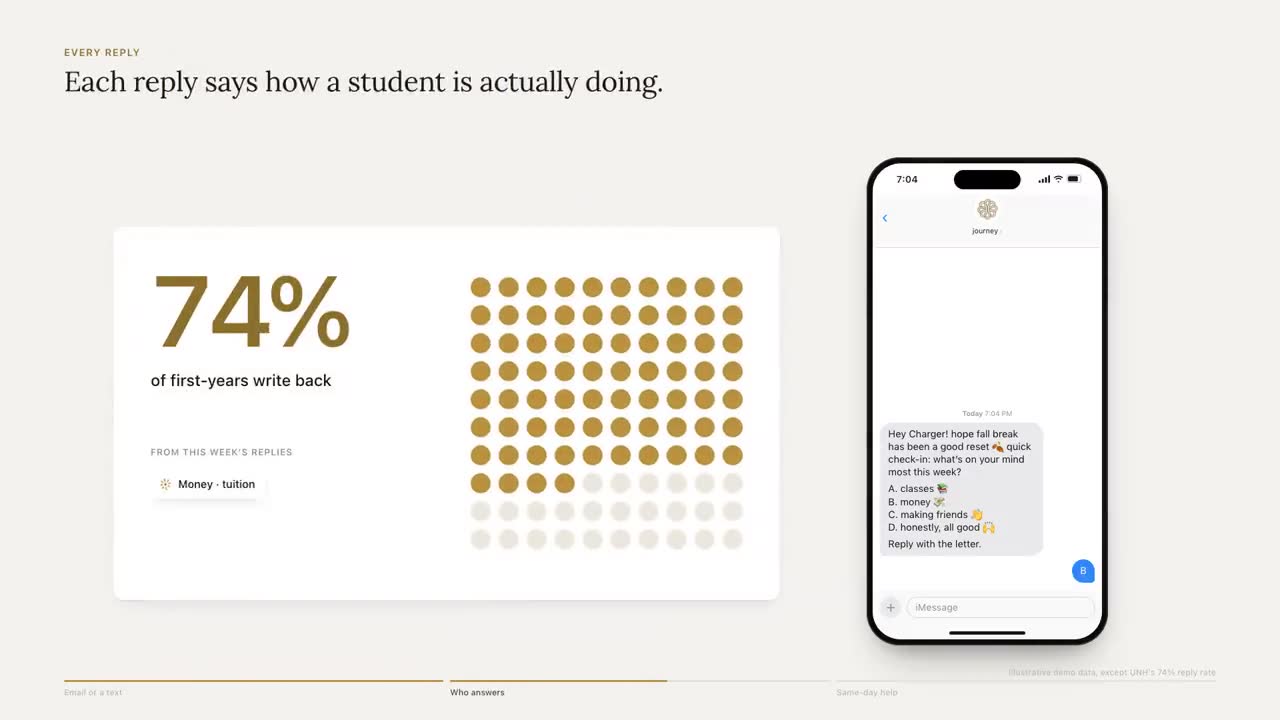
The first row is the one to watch weekly. In our own data, 74% of students in the University of New Haven pilot replied or acted in a typical week. Note how that's defined: students, not messages, and replied or acted, measured in a week.
Be careful with benchmarks
Engagement figures travel badly between campuses and vendors, because the definitions rarely match. One tool's "engagement" counts any reply to any message in a month. Another counts students who replied within a week. A third counts link clicks. Before you compare any two figures, including ours, ask for the numerator, the denominator and the time window. If a vendor can't give you all three, the figure isn't comparable to anything.
Confirmed versus claimed actions
A student texts "went to tutoring". That's a claimed action. The tutoring center's check-in for that student on that day is a confirmed one. Count both, report them separately and never add them together.
Claimed actions still matter. Saying it out loud is part of building the habit, and a claim is often the only signal you get the same day. But numbers that go to leadership should lean on what a second source confirms: appointments kept in the scheduling system, a card swipe at an event, a hold cleared in the student record.
| Action | Claimed | Confirmed by |
|---|---|---|
| Went to tutoring | The student says so | The tutoring center's check-in |
| Met with an advisor | The student says so | The appointment marked as kept |
| Cleared a hold | The student says so | The hold gone from the student record |
| Went to an event | The student says so | The event check-in |
| Filed the FAFSA | The student says so | The aid office's records |
Journey doesn't yet match a student's own report against an event check-in feed to move it from claimed to confirmed. Until your campus has matching like that, keep the two columns by hand: the student's word in one, the office's record in the other, and a weekly count of how often they agree.
Count per student, not per message
Per-message rates are easy to game without meaning to. Send fewer messages to the students who always reply and the reply rate per message goes up while fewer students are reached. Count per student, per week.
- Keep opted-out students out of the denominator, but report the opt-outs on their own line so nobody hides a problem.
- State the denominator every time. "Of the 412 first-years we can text" (an illustrative count) is a different claim from "of the first-year class".
- Watch cohort changes. If students who withdraw drop out of the denominator, the rate can rise as the hardest-to-reach students leave.
Check engagement by student group
An overall rate can hide a gap that matters more than the rate itself. Break the weekly reply-or-act rate out by the groups your campus already tracks: first-generation students, Pell recipients, commuters, part-time students, students who work. If one group replies far less often, the outreach is reaching the students who were already easiest to reach.
When a gap shows up, look at the messages before you look at the students. Common causes are practical: texts timed for residential schedules that land during a commuter's shift, links that assume a laptop, or wording that assumes the student knows what "the bursar" is. Fix the outreach, then watch whether the gap closes over the next three or four weeks.
Themes over time
What students write about changes with the calendar. Belonging and logistics tend to dominate the first weeks, academics climb toward midterms, and money questions arrive when bills and aid deadlines do. Plotted weekly, themes tell you which office will be busy next and which campaign to schedule.
Themes should come from what students wrote, not from a keyword count, and staff should see the theme rather than the transcript. "Lab schedule conflicts with work" is what a coach needs. The message itself stays with the student. We wrote about that line in The Map, Not the Diary.
Leading and lagging indicators
Engagement is a leading indicator. Persistence and retention are lagging ones, and you won't know them until the next term's census. That gap is why engagement metrics matter: you can act on them mid-term, while there's still time to change how the term ends.
Be careful linking the two. Students who reply to texts may differ from students who don't in ways that would affect persistence anyway. A comparison of "students who engaged" against "students who didn't" will flatter almost any program. Compare the whole program group against a comparable group instead, as described in our guide to running a one-semester pilot.
What to show leadership
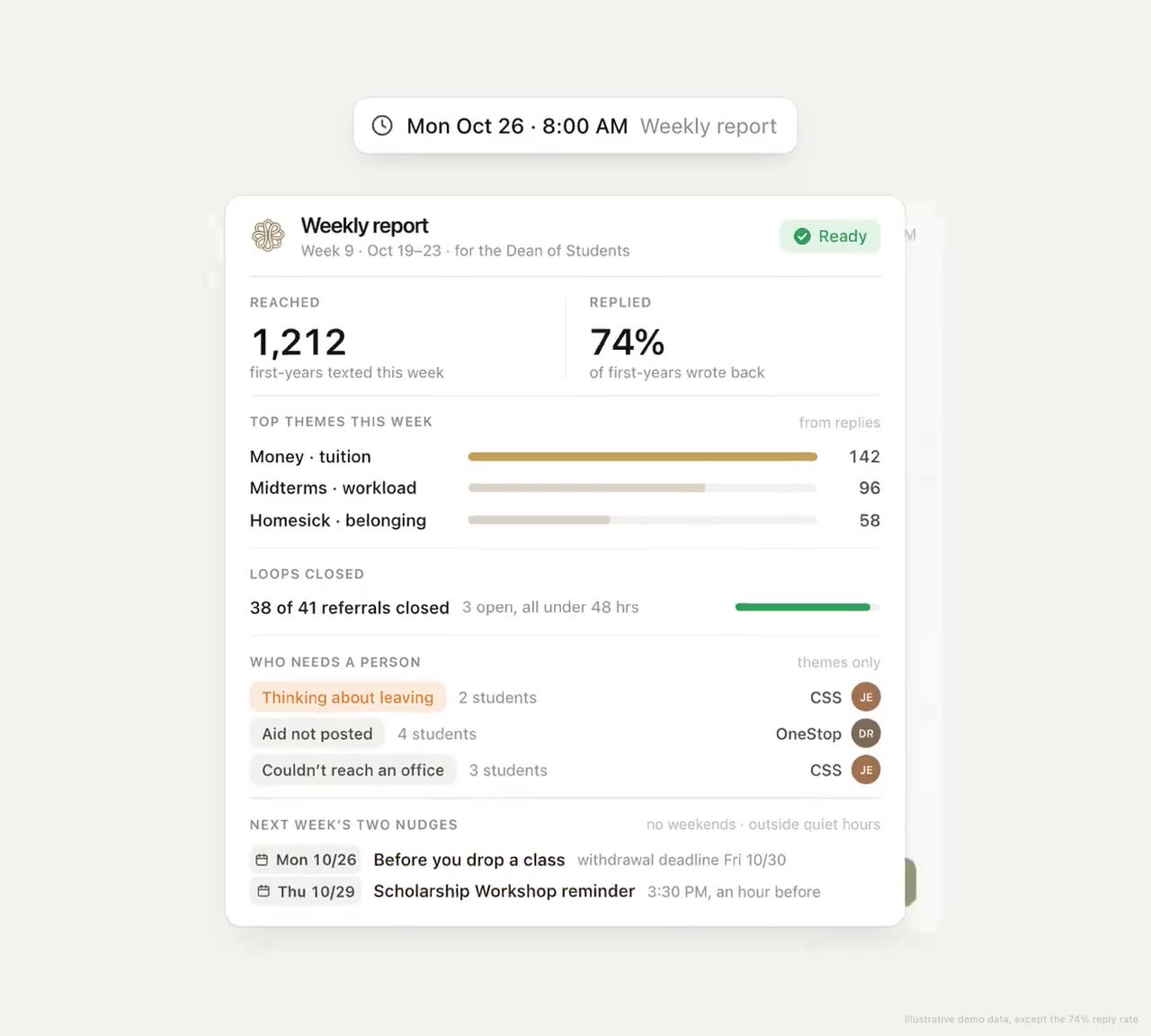
Leadership doesn't need eight metrics. Here's the same week as the opening example, reported two ways. All numbers are illustrative.
| Activity report | Engagement report |
|---|---|
| 4,200 messages sent | 286 of 412 reachable first-years replied or acted this week, up from 251 in week 3 |
| 97% delivered | 9 students have no working number; the registrar is checking them |
| 58% opened | 41 tutoring referrals made, 27 kept (confirmed by check-in) |
| 9% clicked | Median 6 hours from a faculty alert to the student's phone |
| Money was the top theme, mostly billing dates; the bursar has been told |
The right-hand column fits on one page and every line suggests an action. A weekly version needs only six items:
- The weekly reply-or-act rate, with its trend since the start of term.
- Confirmed actions by type, with claimed ones on a separate line.
- Referral completion by office, so a slow handoff is visible.
- The students flagged for a person this week, and how fast each was reached.
- The top themes, with one line on what's being done about the biggest.
- One decision or request, if there is one.
For how that rolls up into a term report for trustees, see Reporting Student Retention to Your Board.
Setting up your measures before the term
- Write the definitions down. What counts as a reply, an action, a referral and a resolution. One page, agreed with institutional research.
- Choose the denominators. Who's in, who's out, and what happens when a student withdraws or opts out.
- Pick sources for confirmation. The scheduling system, event check-ins, the student record. Start with the one or two you can get.
- Pull a baseline. Last term's referral completion and time to first contact, even if they came from email outreach.
- Review weekly. Thirty minutes, the same day each week, with the one-page view. Our weekly review playbook has an agenda.
What the Journey dashboard shows
Journey's dashboard gives staff a short list of students to reach this week and the topics in each one's replies, with a single strip of figures at the top. Each reply, and each heart reaction, is recorded against the nudge it answers, so a response can be counted against the message that prompted it. Each student gets a few texts a week, inside the windows the student chooses, so a reply rate reflects a conversation rather than a blast. Students can text STOP at any time to opt out, or PAUSE to take a week off.
Before your next report goes out, cross out every line that counts messages instead of students, and add the denominator to every line that's left.
Frequently asked questions
What are the best metrics for student engagement?
The weekly share of students who replied or took an action, confirmed actions such as appointments kept, referral completion, time from an alert to first contact, time to close a case, opt-out rate, coverage and the themes students raise over time.
Why are email open rates unreliable for measuring student engagement?
Some mail apps load images automatically for privacy, which registers opens the student never made, and some security tools follow links to check them, which registers clicks. Even an accurate open doesn't show whether the student acted.
What's the difference between a confirmed and a claimed action?
A claimed action is what the student reports, such as "went to tutoring". A confirmed action is verified by a second source, such as the tutoring center's check-in. Count both, but report them separately and lean on confirmed actions for leadership.
How do you compare engagement rates between vendors?
Only after matching the definitions. Ask each vendor for the numerator, the denominator and the time window behind its figure. Monthly replies to any message, weekly replies per student and link clicks are three different measures.