How to Close the Loop on Every Early Alert

Most early alerts stall between the flag and the student. A five-step loop for reaching flagged students the same day, routing by what their reply is really about, and checking back until it's done.
Key takeaways
- An alert is closed when the student got help, the record says what happened, and the professor who raised it heard back.
- Most alerts stall in the middle: email outreach nobody opens, no single owner, and referrals counted as resolved.
- Reach the student by text the same day with one easy question, and let the reply, not the flag, decide who owns it.
- Check back after the appointment, not after the referral. That's the step most processes skip.
Week four. A chemistry professor flags a first-year who has missed two labs and scored 41 on the first quiz. The flag lands in the early-alert system, and an advisor sends the student an email that afternoon. No reply. A second email goes out the next week. Three weeks later the student drops the course, and the alert is still marked open.
Nobody in that story did anything wrong. The professor raised the flag, the advisor reached out, the system recorded it. The loop just never closed, because each step handed the problem to the next one without checking that it arrived. This guide is about closing it: what "closed" should mean, where alerts usually stall, and a five-step loop that works with the staff you already have.
What closing the loop actually means
An early alert is closed when three things are true, not one:
- The student got help, not just a message. A tutoring session happened, a hold was cleared, a conversation with an advisor took place. "Contacted" is a step, not an outcome.
- The record says what happened. Anyone who opens the case next week can see what the issue turned out to be, who owned it and how it ended.
- The person who raised the alert heard back. A professor who flags a student and never hears anything again stops flagging students. One sentence ("she's meeting with a tutor on Thursdays") keeps them in the habit.
Most systems are built to track the first step and the last field. The middle, where a student either answers or doesn't, is where alerts go to die.
Where early alerts stall
The stalls are predictable, and most campuses will recognize a few of them in their own process.
| Where it stalls | Why | What fixes it |
|---|---|---|
| First outreach | It goes by email, from an address the student doesn't know, and asks them to "reach out at your convenience" | A text the same day, in plain words, with one easy reply |
| Ownership | The alert copies three offices, and each assumes another one acted | One named owner per alert, set by what the student's reply is actually about |
| The referral | "Referred to tutoring" is counted as resolved | A check back after the appointment: did it happen, and did it help? |
| The record | Notes live in an advisor's inbox or a shared spreadsheet | One thread per student that the whole team can see |
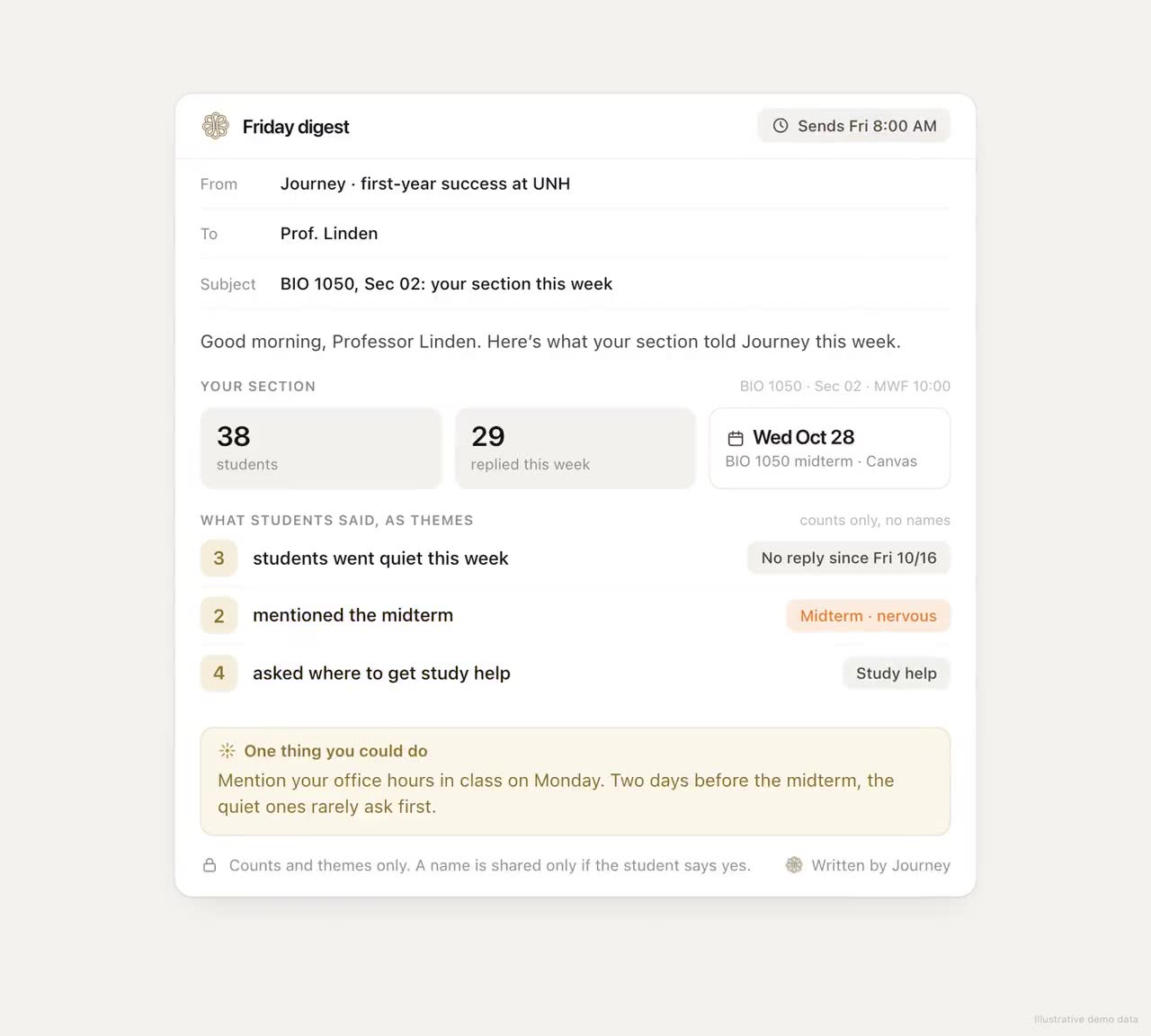
| The professor | They never hear what happened | A short, private-detail-free update when the case closes |
None of these fixes needs a new early-alert platform. They need the alert to reach the student in a channel they read, and someone to keep following it until it's done.
A five-step loop that works
- Reach the student the same day, by text. Not "please contact the advising office". Ask one question they can answer with a single letter. Students answer texts; they file emails.
- Read the reply for what it's really about. A flag for missed labs might be about chemistry, or it might be about a work schedule, money for a bus pass, or a roommate. The reply decides the owner, not the flag.
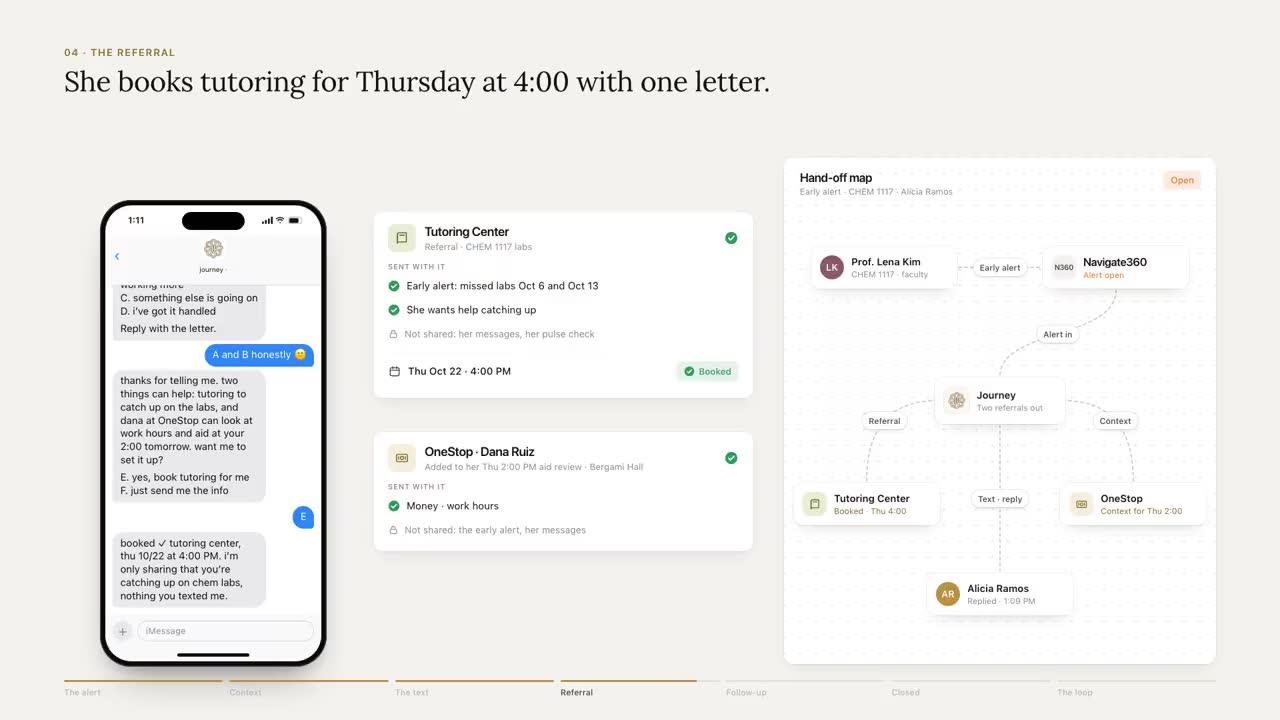
- Make the handoff warm. Give the student a one-tap way to book, and, with their consent, tell the office why they're coming: the reason for the flag, what the student said it's really about, and what's already been tried. Nobody should have to tell their story twice.
- Check back after the appointment. Did it happen? Did it help? If not, the loop isn't closed; it's at step two again.
- Close it in the record, and tell the professor. One line on the outcome. No private detail, just enough that they know the flag mattered.
Here's what steps one through four look like from the student's side. The student is fictional.
 Journey
Text Message
Tue 4:10 PM
hey alicia, quick one. how's chem going? a) fine b) behind but ok c) honestly not great
c
thanks for saying it. is it the material, or is something else eating your time?
both lol. i work 3 nights and the labs are at 8am
that's a lot. two things that help: a chem tutor this week, and a quick talk with your advisor about the lab schedule. want the tutoring link first?
yes
here's chem tutoring, one tap to book. i'll check in after.
Thu 6:02 PM
how'd tutoring go? a) helped b) meh c) didn't make it
a
An illustrative thread with a fictional student. Journey texts first, asks one question at a time and checks back after the appointment.
Two details matter more than they look. The first question offers lettered choices, so answering takes one character. And the follow-up comes after the appointment, not after the referral, so the loop closes on what happened.
What your team should see
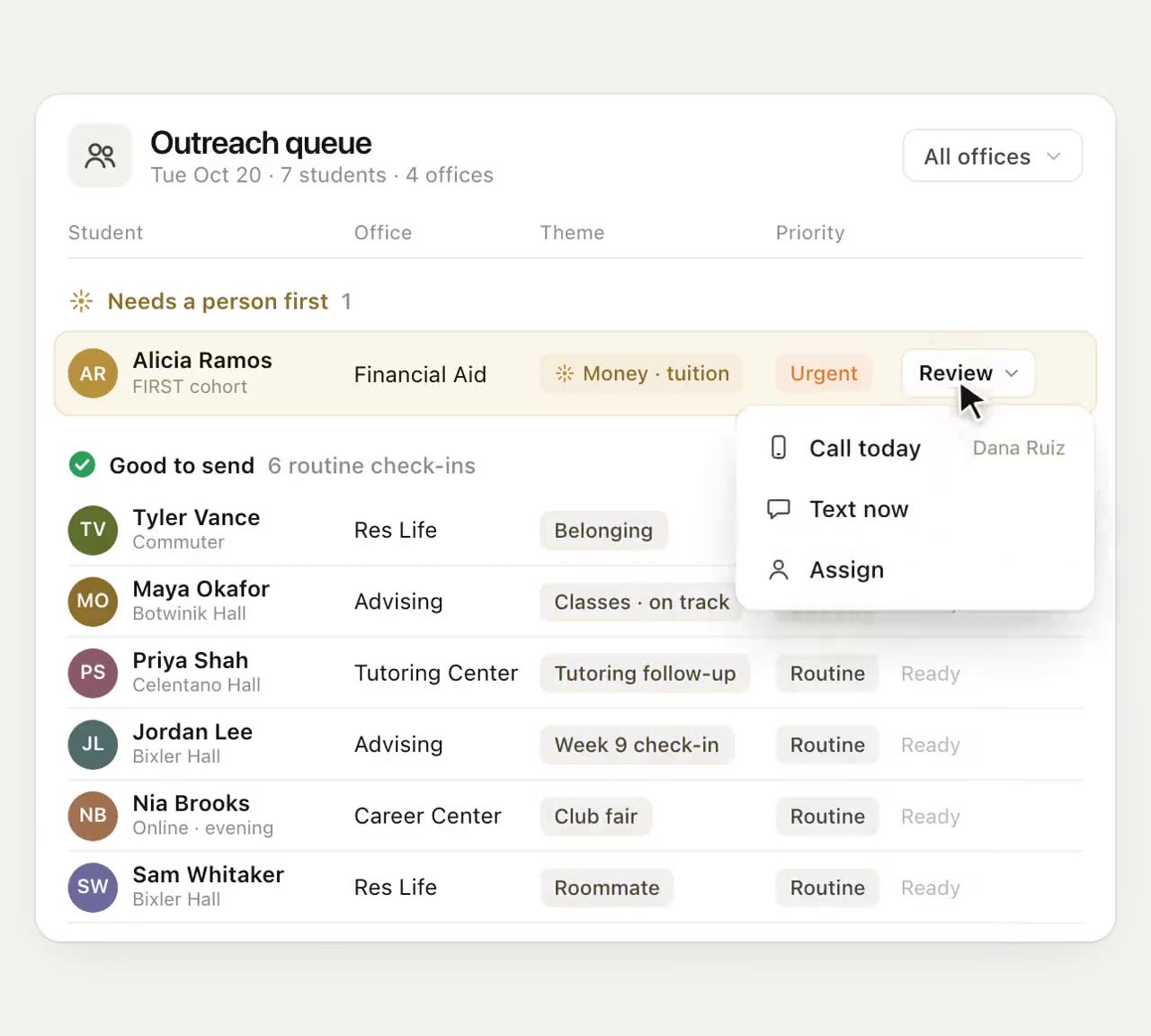
Staff don't need the transcript. They need to know who needs a human, why, and what's already been tried. We call that the map, not the diary. Whatever system your team tracks alerts in, each one needs a theme ("lab schedule conflicts with work"), an urgency, an owner and a status, and the statuses should make the difference between a referral and an outcome obvious:
| Status | Means | Counts as closed? |
|---|---|---|
| Reached | A message went out | No |
| Replied | The student answered, and the reply set the theme | No |
| Routed | An owner has it, with the context | No |
| Met | The appointment or action happened | Almost |
| Resolved | The student says it helped, or the owner confirms the issue is handled | Yes |
If your current reports stop at "Routed", you're counting referrals, not outcomes. The last two rows are the ones worth reporting upward.
What to measure
Pick a handful of measures you can actually act on, and look at them weekly during the first eight weeks of a term, when alerts are most useful.
- Time to first contact. Hours from flag to the student's phone, not to an email queue.
- Reply rate on alert outreach. The share of flagged students who answer at all. If it's low, the channel or the wording is the problem, not the students.
- Referral completion. Appointments kept divided by appointments suggested.
- Time to close. Flag to "Resolved", by office. Long tails point to an ownership gap.
- Faculty alert volume over the term. A sharp drop after the first few weeks can mean professors have stopped believing anything happens.
The part of the loop that talks to students
That middle stretch is the part Journey handles. It texts first, reads each reply for theme and urgency, gets the student to the office that can help with a one-tap link, and can follow up afterwards with a personal nudge that a staff member approves before it sends. Your team works from the partner dashboard, which shows who needs a person this week and what each student's replies were about, without opening anyone's private messages.
Your early-alert platform stays the system of record. Where it offers an API or an export, Journey can read alerts from it. Journey doesn't write outcomes back automatically, so a staff member closes the case in your platform, with the student's outcome already in hand. The middle of the loop depends on students answering. In a typical week of the University of New Haven pilot, 74% of students replied to Journey or acted on a nudge.
Questions to ask any vendor
- What channel reaches the student first, and how fast after a flag?
- Who decides the owner: the flag, or the student's reply?
- What happens after a referral? Does anything check that the appointment happened?
- What do staff see, and what stays private to the student?
- How does the outcome get back into our system of record, and to the professor?
- What happens when a reply contains safety language at 2 AM?
If the answers stop at "we send the message", you're buying the first step of the loop again.
Start with one cohort
You don't need to rebuild your alert process to test this. Pick one cohort that already generates alerts, such as first-years in gateway STEM courses, and run the five steps for a semester. Measure time to first contact, reply rate and referral completion against the term before. The loop either closes more often or it doesn't, and you'll know by midterms.
Frequently asked questions
What does it mean to close the loop on an early alert?
It means the flagged student actually received help, the outcome is recorded where your team can see it, and the person who raised the alert has heard back. Sending an outreach email is the first step of the loop, not the end of it.
Why do students ignore early alert emails?
They often come from an address the student doesn't recognize and ask them to start a conversation with an office. A short text that asks one question, answerable with a single letter, is much easier to answer.
Who should own an early alert?
One named person, chosen by what the student's reply is about. A flag for missed labs can turn out to be about money, work hours or wellbeing, and the right owner follows from that, not from the office that raised it.
Do we need to replace our early-alert platform to close more loops?
No. Your early-alert platform can stay the system of record. What usually needs to change is the outreach channel, ownership and the check back after a referral. Journey can read alerts where your system has an API or an export. Where it has none, Journey can work through the system's web screens with a dedicated, limited account, an option set up with your IT team on request.