Student Success Texting Platforms Compared (2026)

Student engagement platforms do five different jobs. A comparison by category, with each vendor described as it describes itself, the criteria that actually separate them, and the questions to ask in a demo.
Key takeaways
- Student engagement platforms fall into five categories: check-in and coaching chatbots, texting platforms, student success platforms with messaging, CRMs with AI agents, and follow-through layers.
- Feature grids mislead because nearly every product now lists texting and AI. Compare where each product's center of gravity sits instead.
- The criteria that separate vendors are who starts the conversation, what happens to a reply at 11 PM, what staff see, and how a student gets from a text to an appointment.
- Many campuses need two categories. If you run two texting tools, give each a lane, share one opt-out list and keep one campaign calendar.
Somebody on your team has a spreadsheet open with six vendor names down the side and twenty feature columns across the top, and nearly every cell says "yes". Two-way texting: yes. AI: yes. Analytics: yes. The columns stopped helping around row three.
They stopped helping because the tools sold as student engagement platforms do different jobs. Some find out which students are struggling. Some give offices a way to text a whole cohort at once. Some are the system of record where appointments, alerts and cases live. Some are CRMs that now come with AI agents. Comparing them on one feature grid is like comparing a thermometer with a pharmacy because both are about health. This student engagement platform comparison sorts the field into five categories, describes each named vendor only as it describes itself, and ends with the criteria and questions that actually separate them.
Five kinds of student engagement platform
Start by asking which job you're hiring for. Most campuses already own something in two or three of these rows.
| Category | The job it does | Examples covered here |
|---|---|---|
| Check-in and coaching chatbots | Reach students on a regular rhythm, answer their questions, and turn what they say into flags and insight for staff | EdSights, Mainstay |
| Texting platforms | Give offices a channel students actually read, for one-to-one texts and campaigns | Modern Campus Message (formerly Signal Vine), Mongoose |
| Student success platforms with messaging | Hold the record of advising, appointments, alerts, cases and referrals, with texting built in | EAB Navigate360, Starfish |
| CRMs with AI agents | Keep the lifecycle record from inquiry onward, with agents layered on top | Element451, Salesforce Education Cloud |
| A follow-through layer | Get a student who's struggling to take the next step, and tell staff who still needs a person | Journey |
The lines blur. Texting platforms add AI, success platforms add texting, chatbots add risk flags. The useful question is still where each product's center of gravity sits, because that's what it will do best on a busy Tuesday in week six.
Check-in and coaching chatbots
EdSights. According to its website, EdSights uses AI-powered texting to reach students proactively. Its retention product, EdSights Retain, runs text check-ins every 7 to 10 days across four persistence drivers (academics, finances, engagement and wellness), and EdSights says the framework is grounded in Vincent Tinto's persistence research. The company says Retain flags students by risk level for advisor follow-up, gives staff a prioritized list of who needs them, and that EdSights itself manages the communication plan, including weekly campaigns and the copywriting. It also describes a 24/7 chatbot, whitelabeled for each institution, that answers questions from a knowledge base EdSights builds and maintains, plus a Student Voice Score for benchmarking. EdSights says more than 300 universities use it.
Mainstay. Mainstay describes its approach as human-centered and AI-enhanced: AI success coaching on each student's phone, a conversation co-pilot for staff, and conversation insights for leaders, built on evidence-based messaging and pre-built conversation libraries. Its about page says it began as AdmitHub in 2014 and works over SMS, live chat, web chat and social media. In March 2026, Lemnis, which describes itself as a public charity, announced that Mainstay would convert from a public benefit corporation into a division of Lemnis. That announcement put Mainstay's technology at more than 200 colleges and universities.
What this category does well is reach a whole population at once, answer the questions students actually ask, and give you a read on how they're doing without waiting for midterm grades. Bring one question to every demo: after a student is flagged, what happens next, and who makes it happen.
Texting platforms
Modern Campus Message. Modern Campus announced it had acquired Signal Vine in January 2022, and the product is now called Modern Campus Message (formerly Signal Vine). Modern Campus describes it as a conversational texting platform for two-way texting with students, built on what it calls patented Blended Messaging, which combines AI-driven automation with one-to-one conversation in a single thread. It says messages can be targeted with data from your student information system and CRM, engagement tracked in real time, and follow-up automated with a campaign builder.
Mongoose. Mongoose calls itself the engagement platform higher ed trusts to reach every student, and a secure AI engagement platform for education. It says it supports two-way conversations across text, WhatsApp and web chat, works alongside your CRM and SIS rather than replacing them, and offers AI agents, including an inbox assistant for staff. It lists enrollment, student success and advising, advancement, financial aid, registrar and housing teams among its users, and says more than 1,000 higher-ed institutions use it.
These platforms are built around your offices' outreach: your staff decide what goes out and to whom, and automation and AI agents help them hold more conversations than they could by hand. They're a strong fit when several offices each need a reliable texting channel of their own.
Student success platforms with messaging
EAB Navigate360. EAB calls Navigate360 the leading higher education CRM and says more than 850 institutions use it. Its product page lists appointment scheduling, faculty progress reports, alerts, cases and referrals, analytics including a predictive model, two-way SMS, a student app, an AI assistant for staff and a student-facing AI knowledge agent.
Starfish. EAB completed its acquisition of Starfish, which it described as a student success platform, from Hobsons in March 2021.
If your campus runs one of these, it's almost certainly your system of record for advising, and you're not shopping for a replacement. The real decision is what, if anything, sits next to it. We wrote a separate piece on how a texting layer fits a success platform.
CRMs with AI agents
Element451. Element451 describes itself as an AI CRM and agent platform for higher education. It says its Bolt agents can run on your existing systems or come bundled with its CRM, and describes Bolt for Student Success as a way to spot at-risk students early. It says more than 400 institutions use it.
Salesforce Education Cloud. Salesforce describes Education Cloud as combining its CRM with student information capabilities, with features for student success and advising. Its education pages also describe building AI agents that give students proactive support around the clock.
CRMs are where a campus keeps one record of a person from first inquiry through graduation. They're a big decision with a long tail, usually made by enrollment and IT together, and texting is one feature among many.
A follow-through layer
This is the category we built Journey for, so here is the honest version. Most of the tools above are good at finding out who is struggling, or at giving staff a channel to reach them. Journey is built for the step after that: getting the student to act.
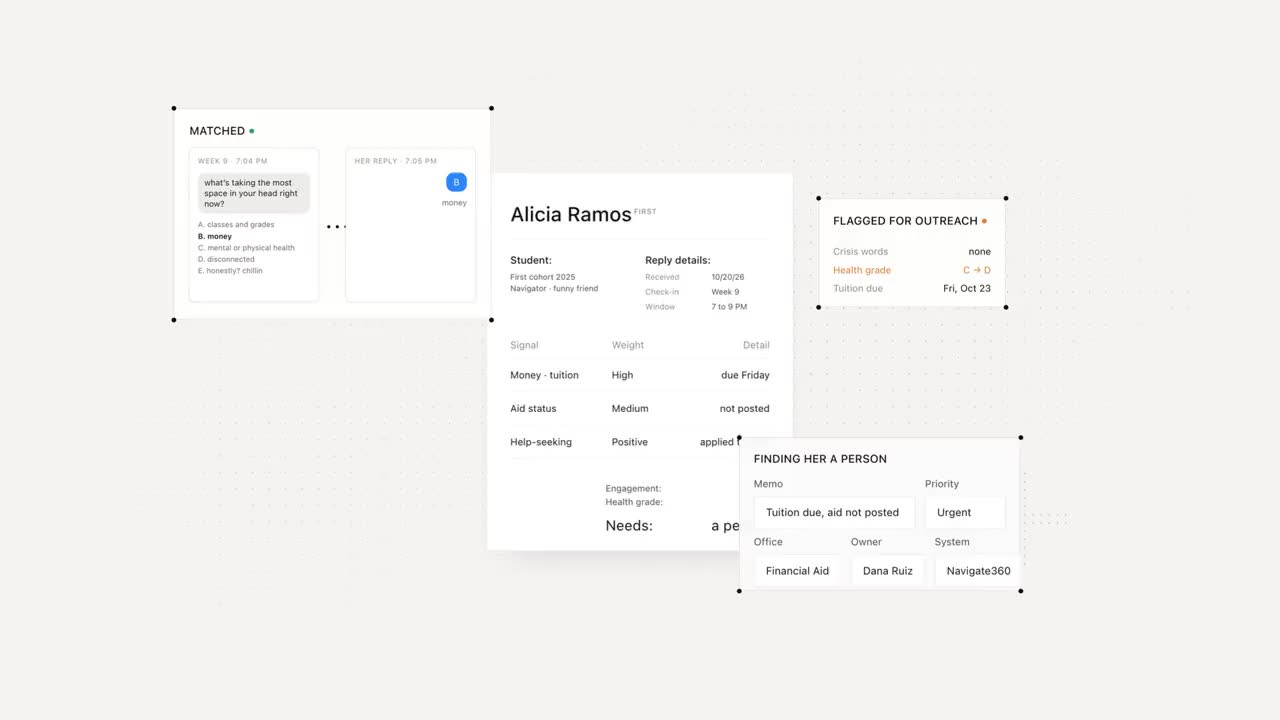
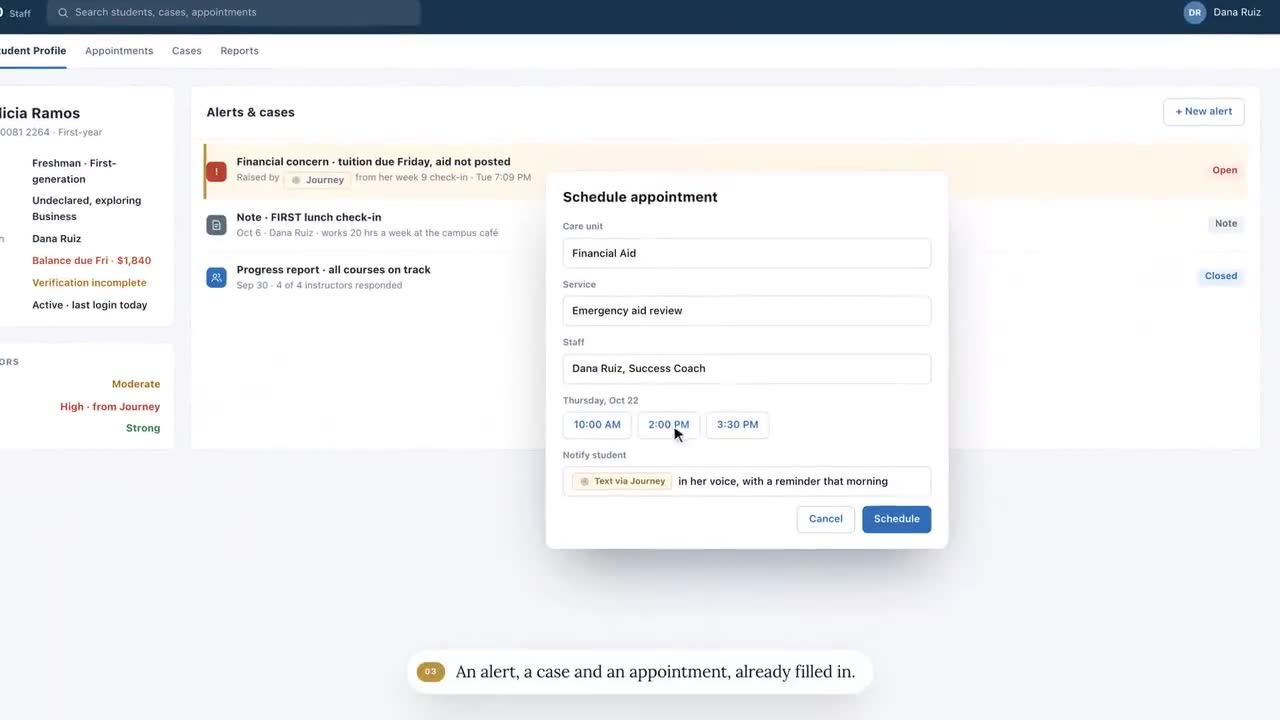
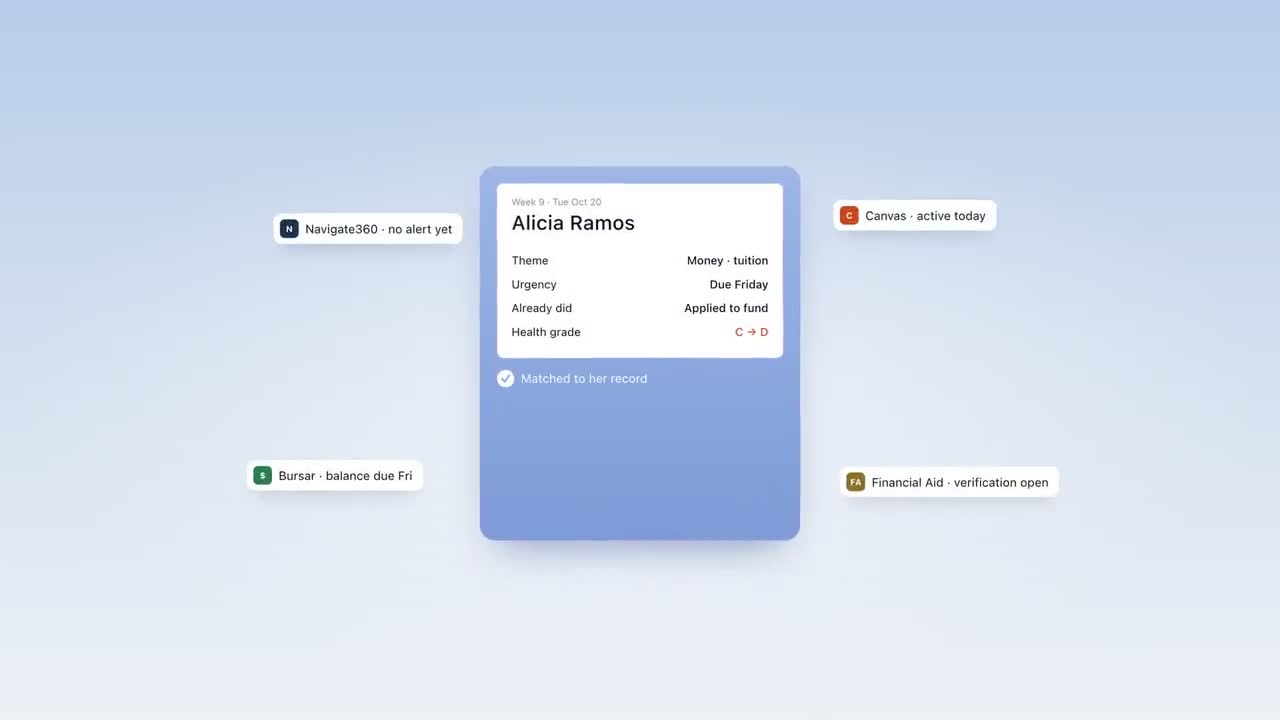
Journey texts each student first, over SMS or iMessage, with nothing to install and no login. In an onboarding that takes about 90 seconds, students rank their goals, pick the events they care about and choose the voice Journey texts them in. Nudges are built from those goals and the student's own words, a few texts a week, inside the windows the student chooses, with no more than one proactive text a day and nothing during quiet hours. Students can ask anything about campus, and answers come from a resource base gathered at setup. Replies are triaged by what they're about and how soon a person should see them, safety language goes to people, and a one-tap scheduling link takes the student to the office that can help. Staff work from a dashboard listing the students who need attention, with the gist of what each one wrote rather than the transcript.
In a typical week of the University of New Haven pilot, 74% of students replied to Journey or acted on a nudge. The University of New Haven began with a 100-student pilot and expanded Journey to 1,800 students the following fall.
What Journey is not: a system of record, a case-management tool, an admissions CRM or a population-wide risk score with peer benchmarks. If that's the gap, one of the categories above is the better fit, and Journey can sit beside it.
Criteria that actually separate them
These are the questions where vendors give genuinely different answers. Ask them in the demo and write down the answer word for word.
| Ask | Why it matters | A strong answer sounds like |
|---|---|---|
| Who starts the conversation? | Students who are slipping rarely ask for help first | The product reaches out on a schedule that fits the student, not only when a staff member hits send |
| Who writes the messages, and how often are they refreshed? | A term's worth of good texts is hundreds of messages, and stale ones get ignored | A named owner, a library you can see, and a refresh before each term |
| How many texts does one student get in a busy week, from every campus sender? | Students opt out of the campus, not of one vendor | A cap the vendor enforces, plus a way to see other senders' schedules |
| What happens to a free-text reply at 11 PM? | The reply is the whole point of texting | It's read right away and judged for urgency, and safety language reaches a person through your escalation process |
| What do staff see? | Transcripts don't scale, and students may write less freely if they think staff read every word | Who needs a human, why, and what's been tried, with the student's words kept private unless they agree |
| How does a student get from a text to an appointment? | "Contact the advising office" is where referrals go to die | One tap to book with the right office, and a follow-up afterward |
| What does "engaged" mean in your reports? | An open, a reply and an action are different numbers | A written definition, a denominator and a period ("replied or acted, in a typical week") |
| Where does the record live, and how does it get there? | Double entry kills adoption | Your system of record stays the system of record, fed by an API or an export |
Which category fits which problem
| If the problem sounds like… | Look first at |
|---|---|
| "We don't know who's struggling until midterm grades post" | A check-in chatbot, or the alerts in your success platform |
| "Our offices email students and nobody answers" | A texting platform, or the texting already inside your success platform |
| "Advising notes live in five inboxes and a spreadsheet" | A student success platform |
| "We want one record from inquiry to alumni" | A CRM |
| "We know exactly who's struggling, and they still don't show up" | A follow-through layer |
Many campuses need two of these, and that's fine. What doesn't work is buying a second tool to do the first tool's job, because nobody wanted to admit the first one was the wrong category.
Running two tools without texting students twice
If you add a texting product next to one that already texts, students will notice before your staff do. A few rules prevent most of the trouble:
- Give each sender a lane. For example, your success platform sends appointment confirmations and office campaigns; the follow-through layer sends nudges and holds the conversation. Write the split down.
- Share one opt-out list. A student who texts STOP to one number has told the campus something. Honor it everywhere you can, and ask counsel how your policies treat it.
- Keep one campaign calendar. Registration week is when every office wants to text. Someone has to see all the sends side by side.
- Introduce each number once. Tell students who is texting them and why, from a channel they already trust, before the first message lands.
Questions to ask any vendor in the demo
- Show me one student's week: every text they'd get from you, and when.
- What happens when a student replies with something your system didn't expect?
- Show me what an advisor sees on Monday morning, and how long it takes to act on it.
- What happens when a reply contains safety language at 2 AM?
- How do outcomes get back into our system of record?
- Which of the features in this demo are live today, and which are on the roadmap?
- What did a pilot campus tell you didn't work?
The last two questions are the ones that tell you most about a vendor. Anyone can show a roadmap. The ones worth working with will tell you which parts aren't built yet, and what they learned from the campus where it didn't land.
Frequently asked questions
What is the difference between a student engagement platform and a student success platform?
A student success platform, such as EAB Navigate360, is usually the system of record for advising, appointments, alerts and cases. Engagement tools, such as check-in chatbots and texting platforms, focus on reaching students and hearing back from them. Many campuses run one of each.
Which texting platforms do universities use to reach students?
Options include texting built into student success platforms and CRMs, dedicated higher-ed texting platforms such as Modern Campus Message (formerly Signal Vine) and Mongoose, check-in and coaching chatbots such as EdSights and Mainstay, and follow-through tools such as Journey. Which fits depends on whether you need a channel for staff, a read on who is struggling, or help getting students to act.
How do I compare student engagement platforms fairly?
Ask every vendor to show one student's full week of texts, what happens to an unexpected reply, what an advisor sees on Monday morning, how outcomes reach your system of record, and which demo features are live today. Write the answers down word for word.
Can we use two texting tools at once?
Yes, if each has a clear lane. Decide which messages come from which sender, keep one opt-out list where your policies allow, keep one campaign calendar, and introduce each number to students before its first message.