How to Identify At-Risk Students Before Midterms

Static risk scores miss what changes once the term starts. Which live signals to watch, why a drop from a student's own usual matters most, what a useful flag should say, and what to do in the first 24 hours.
Key takeaways
- Pre-enrollment risk scores are useful for planning caseloads, not for telling you who is struggling this week.
- Watch live signals: replies and pulse answers, LMS activity, attendance, holds, missed appointments and schedule changes. Two signals from different sources usually mean something.
- Compare each student with her own usual. A student who always replied and has gone quiet for nine days matters more than one who's always quiet.
- A flag should explain itself: the signals with dates, the baseline, the source, what's been tried and a suggested owner.
- In the first 24 hours, text the student, read the reply, name one owner, make a warm handoff, write it down and set the check back.
A risk score finished before the term starts can't tell you who is struggling now. A model can rate a first-year "moderate risk" from her high school grades, her aid file and the distance from home, and the rating will still say moderate in week six, after she has stopped going to her 8 AM lab, missed two assignments and gone nine days without answering a text. Nothing it was built from has changed.
To identify at-risk students before midterms, you need two kinds of information: what you knew at enrollment, and live signals that change week to week. The live signals matter most in the first half of the term, and the most useful of them is often a change against the student's own usual rather than a number below some average. This guide covers which signals to watch, how a flag should explain itself, and what to do in the first 24 hours after one goes up.
What a static risk score can and can't tell you
Pre-enrollment risk scores are built from data you have before the term starts: high school GPA, test scores where they exist, first-generation status, aid eligibility, residence, sometimes how early a student deposited. They're useful for one job, which is deciding where to put people before the term begins: which students get assigned a success coach, which advisors carry smaller caseloads.
They're poor at the job most people ask of them, which is telling you who is in trouble now. A score set in August doesn't move when a student starts working nights in September. Scores built heavily on demographic fields can also flag students for who they are rather than for what is happening to them, which is a fairness problem as well as a timing one. A first-generation student doing well doesn't need a weekly call about it.
Keep the score for planning. For the weeks before midterms, watch what changes.
Live signals worth watching
| Signal | What it looks like | Where it comes from | Watch out for |
|---|---|---|---|
| A change from her own usual | A student who replied every week goes quiet, or replies get shorter | Your texting or advising records | Some quiet weeks are just busy weeks. Ask, don't assume |
| Self-report | Picking "not great" on a pulse check, or "behind" two weeks running | A weekly or biweekly pulse question | Only as good as your reply rate |
| LMS activity | No logins for a week, two missing submissions | Your LMS, where courses use it | Some courses barely use the LMS; activity isn't learning |
| Attendance | Two missed sessions of a small class or lab | Faculty, swipe data, attendance tools | Large lectures often don't track it |
| Holds and balances | A hold that will block registration, an aid document still missing | The bursar, financial aid, the registrar | Often never reaches advising |
| A missed appointment | A no-show to advising or tutoring | Your scheduling system | One no-show is noise; a second is a pattern |
| Schedule changes | Dropping below full time, asking about withdrawal | The registrar | Sometimes a smart move, sometimes the first step out |
| Faculty concern | An early alert, especially from a small class | Your early-alert system | Participation varies by department |
One signal rarely means much. Two from different rows usually do. A student who has a registration hold and has gone quiet on texts is a different case from either alone, and much more urgent. For how early alerts fit in, see early alert systems in higher education, and for the weekly question that produces self-report, pulse checks by text.
Below her usual, not below average
Averages hide the students you most need to see. A commuter who works weekends and never replies on Saturdays isn't at risk because she's quiet on Saturdays. A student who replied within an hour every Tuesday for six weeks and has said nothing for nine days might be.
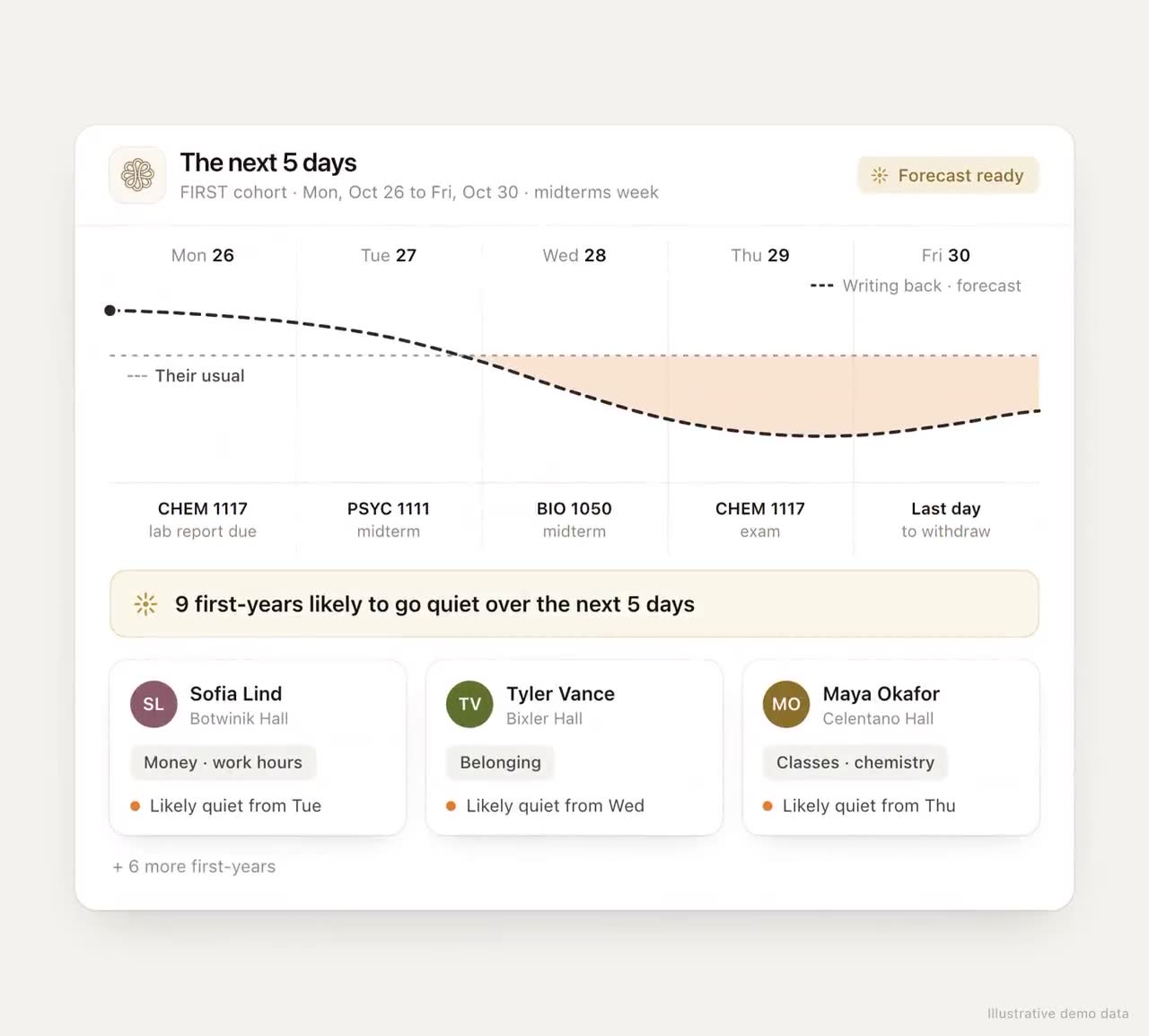
Comparing each student with her own pattern catches the second case and ignores the first. In practice that means keeping a simple baseline for each student: how often she usually replies, when, how much she says, how her pulse answers usually run. Then flag a drop that lasts more than a week, and send a check-in that evening. We've designed this as a per-student reply chart that sets off the check-in by itself; so far it exists only in our demos, with illustrative data, not as a shipped screen.
The same idea applies to a whole semester. One line per student, showing replies, pulse answers and visits over time, lets an advisor see at a glance whether this week is unusual for this student.
A flag should explain itself
"High risk" is not something an advisor can act on. "Missed two of the last three labs, no LMS login since Thursday, a hold that will block registration, usually replies within a day and hasn't for nine" is. A flag that explains itself spares the advisor the digging through three systems at the start of every case, and makes it more likely that someone acts on it.
A good flag carries:
- The signals, in plain words, with dates.
- The baseline, so the reader knows why this is unusual for this student.
- The source of each signal, so nobody acts on a data error.
- What's already been tried, so the student isn't contacted three times about the same thing.
- A suggested owner, which can change once the student replies.
A pre-midterm timeline
Midterms usually fall around weeks seven and eight. Working backwards, there are four windows worth planning for.
| Week | Look for | Do |
|---|---|---|
| 1 to 2 | No-shows, no LMS login, not registered for a full load, no reply to the welcome | A text the same week. Most of these are logistics, and fast to fix |
| 3 to 4 | The first pulse answers, the first faculty flags, the first missing assignments | Reach every flagged student within a day; route by what they say |
| 5 to 6 | First quiz scores in gateway courses, holds, replies dropping off | Tutoring before the next exam; holds cleared; a check-in for anyone below their usual |
| 6 to 7 | Any student with two or more signals | A conversation with a person, not only a text, before midterm grades are posted |
The goal is that nobody's first contact about a problem comes after their midterm grade. By then the withdrawal deadline is close and the options are fewer. For the stretch just after, see weeks 6 to 9: a playbook for the midterm slump.
The first 24 hours after a flag
- Text the student within a few hours. One question, from a sender they know: "hey, checking in. how's this week going?" with lettered choices from fine to not great.
- Read the reply for what it's actually about. Missed labs might be about chemistry, a night job, a bus that doesn't run early, or something at home.
- Name one owner the same day. Chosen by the reply, not by the office that raised the flag.
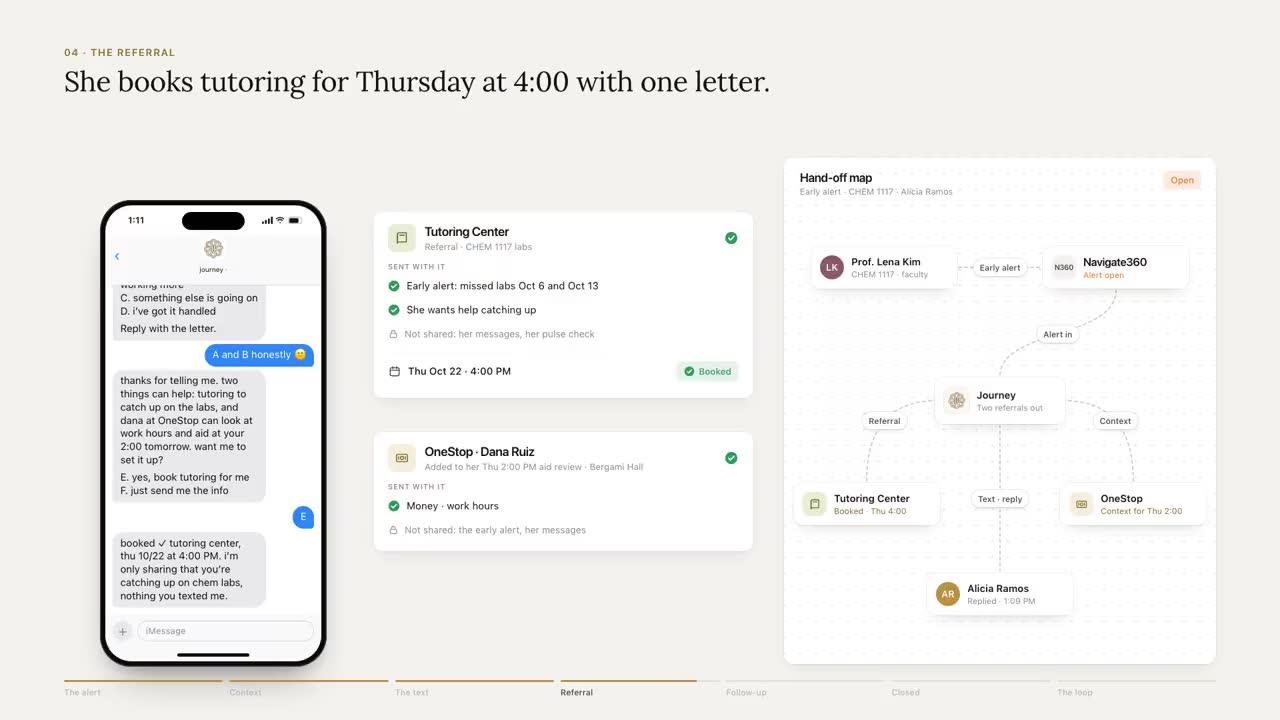
- Make the handoff warm. A one-tap booking link, and, with the student's consent, a note to the office so she doesn't tell her story twice.
- Write it down where the team can see it. One line: what the signal was, what the student said, who owns it.
- Set the check back. After the appointment if one was booked; in two or three days if there was no reply.
If there's still no reply after two days, change the messenger, not just the message. A call from an advisor she has met, a word from her RA, or a note from the professor who raised the flag often gets through where a fourth text won't. The full loop, through to a closed case, is in how to close the loop on every early alert.
Adding the student's own voice to your signals
The signal many campuses lack is the student's own voice, week to week. Journey texts each student a few times a week inside the windows they chose, and reads every reply for what it's about and how urgent it is. That gives you the self-report rows of the table above for students who would never fill in a survey, and a record, nudge by nudge, of who replied and who didn't. Safety language goes to people straight away. A student who texts "talk" is told a staff member will reach out, and one who says she's leaving the university is flagged to staff. Your team works from a dashboard of who needs a conversation this week, with each student's themes rather than the messages themselves.
Three views in this article aren't shipped yet: the per-student chart, the semester line, and flags assembled from LMS, hold and housing data. Where your systems offer an API or an export, Journey can read holds, schedules and alerts from them; where they don't, we can work through their web screens, set up with your IT team.
How to tell if your flags are any good
Run these numbers at the end of the term, and you'll know what to change for the next one:
- Lead time. Days between a student's first flag and their midterm grade. You want weeks, not days.
- Hit rate. Of the students you flagged and reached, the share who turned out to need help. Low means your flags are noisy, and advisors will start ignoring them.
- Misses. Of the students with a D or F at midterm, the share you'd flagged before. Low means you're watching the wrong signals.
- Reach. The share of flagged students contacted within 24 hours.
- Outcome. The share of flagged students who met with someone and got help, by the end of the term.
No system catches everyone. The aim is to catch most students while there's still time to help, and to have a flag that tells the person reaching out what to say.
Frequently asked questions
How do you identify at-risk students in college?
Combine what you knew at enrollment with live signals that change week to week: the student's own replies and pulse answers, LMS activity, attendance, holds and balances, missed appointments and schedule changes. Look for a change from each student's usual, and for two signals from different sources.
What are the early warning signs that a college student is struggling?
Going quiet after replying regularly, sliding answers to check-in questions, missing assignments in one course, a no-show to tutoring or advising, a hold that will block registration, and questions about dropping or withdrawing. Any safety language needs a person immediately.
Are predictive risk scores reliable for finding at-risk students?
They can help decide where to put advising capacity before a term starts, but they're built from data that doesn't change once classes begin, so they can't tell you who is struggling now. Scores built heavily on demographic fields can also flag students for who they are rather than for what's happening to them.
What should an advisor do when a student is flagged as at risk?
Within a day, text the student one easy question, read what the reply is really about, name one owner, offer a one-tap way to book help, record it where the team can see it, and set a check back. If there's no reply in two days, try a different messenger.