How Journey Reads a Reply in the Time It Takes to Put the Phone Down

What happens to one student text after she sends it: a safety check, theme, urgency, her history and goals, then an answer from the campus resource base or a person. What staff see, and where humans stay in the loop.
Key takeaways
- Every reply is checked for safety language first, and safety concerns always go to people through the escalation process your campus sets.
- What a reply is about and how soon it matters are judged separately, because a real worry and a this-week deadline are different things.
- Questions the campus resource base can answer get an answer with a link. Anything that needs an office's decision goes to a person, with a one-tap scheduling link.
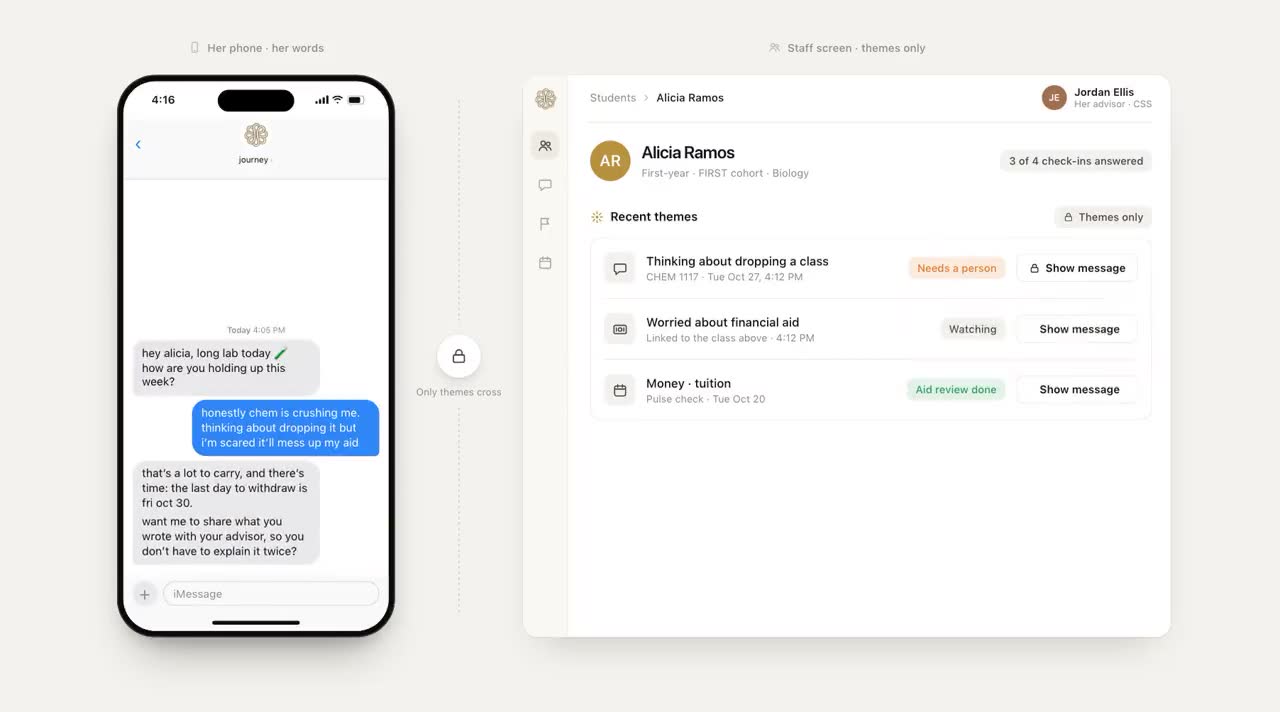
- Staff see what each reply was about, how pressing it is and which students to reach, not transcripts.
Tuesday, 7:09 PM. Alicia answers Journey's check-in with one line: "tuition is due friday and my aid hasn't come through." Then she puts the phone face down and goes back to her shift. What happens to that line next decides whether anyone at the university hears about it before Friday.
AI triage of a student message means reading a reply for what it's about and how soon it matters, then deciding whether it can be answered on the spot or needs a person. Here's what Journey does with every reply, what your staff see afterwards, and the places where a human is always in the loop.
What happens to one reply
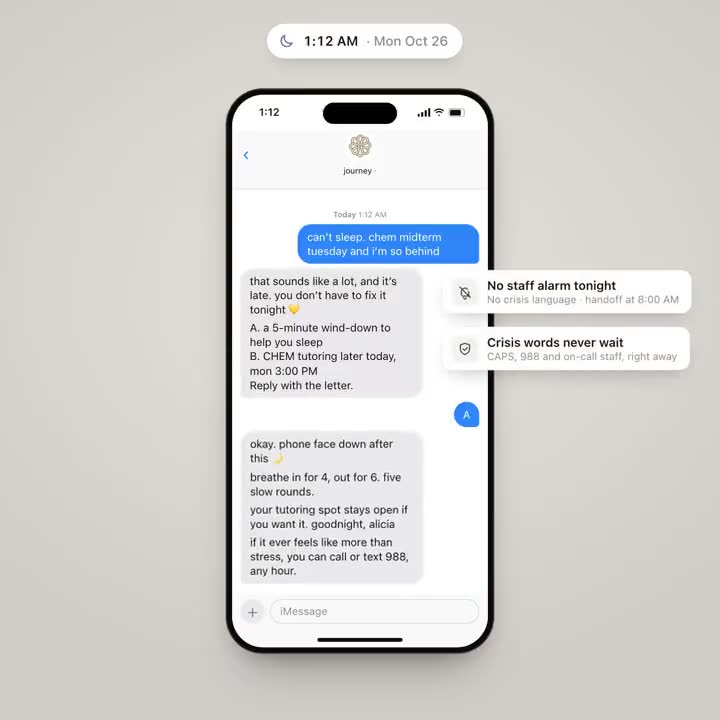
- Safety comes first. Before anything else, the reply is checked for safety language. A message showing a student in crisis gets an immediate reply with 988 and campus health and wellness, and your campus team is alerted. Quieter signs that she's struggling alert staff without interrupting the conversation. Journey is not a crisis line: when a message raises a safety concern, it surfaces the right human path (counseling, 988, the on-call staff your team names) and follows the escalation process set up with your campus.
- What it's about. The reply is read for its theme, such as money, academics, wellbeing, belonging or logistics. Alicia's is money, specifically tuition and aid.
- How soon it matters. "Due friday" makes it this week. "i've been kind of lonely this semester" is real but not a Friday deadline. Urgency is read separately from theme because the two don't move together.
- Her goals and recent conversation. The reply draws on what she ranked at onboarding, her classes, her free time and what she's said lately, so a student who works three nights doesn't get advice written for someone with free evenings.
- An answer or a person. If it's a question the university's own information can answer (hours, locations, how to book), Journey answers with the link. If it needs a decision only an office can make, Journey gets her to that office with a one-tap scheduling link and adds her to the team's outreach list.
For Alicia, that's financial aid. Journey tells her who can help and how to book, and the next time her team opens the dashboard, they see that her reply was about money and matters this week.
The reply she gets is short and warm, around 40 words. Journey answers up to five times a day; after that it points her to campus health and wellness rather than becoming the only place she talks things through.
Triage in practice
Most replies are not emergencies, and treating them all as one would bury the ones that are. A few illustrative examples of how different replies are handled:
| The reply | Theme | Urgency | What happens |
|---|---|---|---|
| "when does the library close tonight" | Logistics | Now, low stakes | Answered from the campus resource base |
| "i think i'm failing chem" | Academics | This week | A one-tap link to tutoring |
| "tuition due friday, aid not posted" | Money | This week | Financial aid, with a person on the list |
| "i don't really know anyone here" | Belonging | Ongoing | A warm reply and one small next step |
| Safety language, at any hour | Wellbeing | Now | An immediate reply with 988 and campus health and wellness, and your team alerted |
| "talk" | Asking for a person | Now | "a staff member will reach out as soon as possible" |
| "i think i'm going to leave" | Leaving the university | This week | Staff are notified |
| "thanks" | Acknowledgement | None | No reply, by design |
When Journey doesn't know the answer, it says so and points to a person, rather than guessing. Students can also steer it: a text that starts with the campus name gets a campus answer, and one that starts with "j" gets a Journey reply.
What staff see afterwards
Staff don't get the transcript. They get the map, not the diary: the themes of a student's replies, how pressing they are, the short list of students to reach and the notes colleagues added after meetings. That's enough to act on, and it keeps the student's own words where she put them.
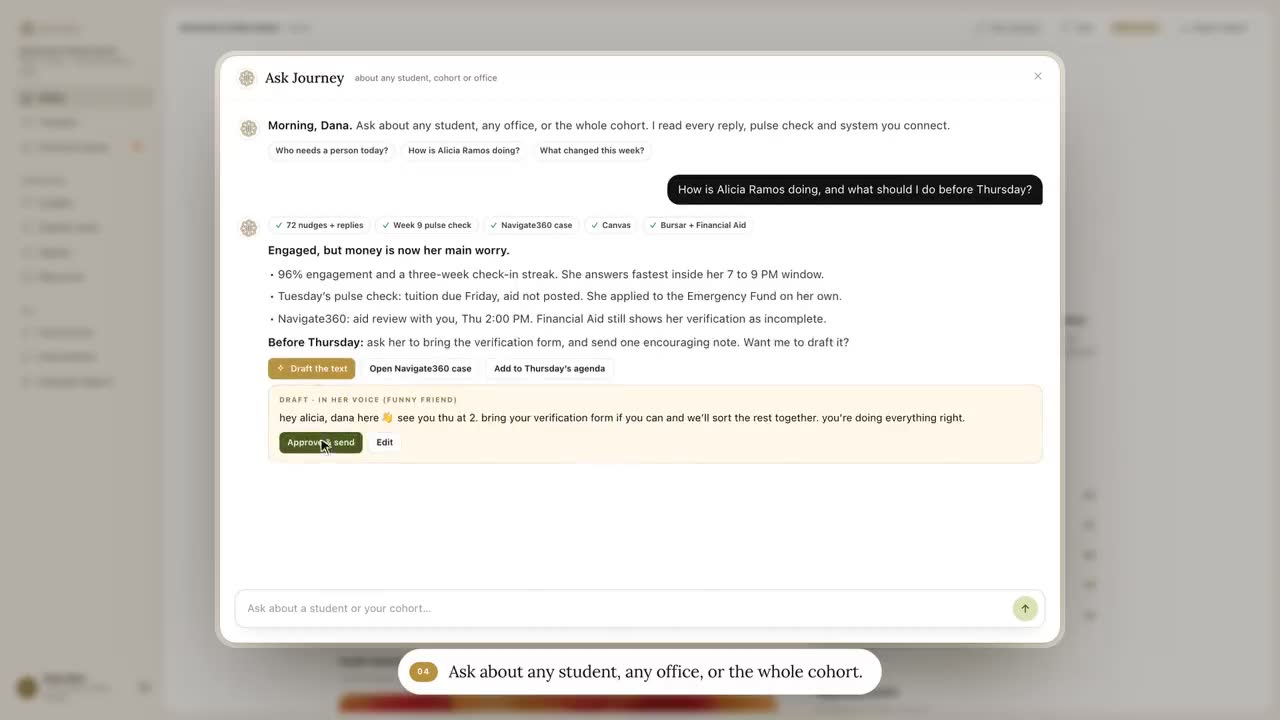
The demo at the top of this page shows the same lookups and the same routing into Navigate360. Neither is a shipped feature. Where a campus system offers an API or an export, Journey can read from it, and that's set up campus by campus.
Where a human is always in the loop
- Safety. Safety language always reaches people. Journey never handles it alone.
- Decisions. Aid, holds, grades, withdrawals and anything else an office decides stays with that office.
- Uncertainty. When the resource base doesn't cover a question, the answer is a person, not a guess.
- The relationship. Journey never replaces a counselor or an advisor. It gets the student to one sooner.
Questions to ask about any AI triage
- What is checked first, and what happens when a reply contains safety language at 2 AM?
- Where do answers come from, and who keeps that source current?
- What does the system do when it doesn't know?
- Who decides the owner: a keyword, or what the reply is actually about?
- What do staff see, and what stays private to the student?
- How fast does a student who needs a person actually reach one?
Speed is easy to show in a demo. Spend most of the evaluation on what the system leaves to people, and how quickly it gets a student to one.
Frequently asked questions
What is AI triage of student messages?
Reading each student message for what it's about and how soon it matters, then deciding whether it can be answered directly or needs a person. Good triage checks for safety language before anything else.
Can AI safely answer students' text messages?
For campus questions with clear answers, such as hours or how to book tutoring, yes, if the answers come from a source the campus maintains. Anything involving safety, aid decisions, holds or grades should go to a person.
What happens when a student texts something concerning at 2 AM?
Safety language is checked first on every reply, at any hour. A message showing a student in crisis gets an immediate reply with 988 and campus health and wellness, and your campus team is alerted. Journey is not a crisis line, and it follows the escalation process set up with your campus.
Do staff see students' messages?
Staff see the themes of a student's replies, how pressing they are and whether the student is on this week's outreach list, rather than transcripts. That's enough to act on, and it respects the student's privacy.