FAFSA and Financial Aid Reminders Students Act On

Most aid reminders ask for too much, in the office's words, at the wrong time. How to write FAFSA and financial aid texts that ask for one step, arrive when students can act, and hand money questions to a person.
Key takeaways
- Aid reminders usually fail because of how they're built: office jargon, links to a portal login, several asks in one message, and timing set by the office's calendar.
- Build reminders around moments in the aid season, such as verification or a first loan, and take the dates from your own financial aid office.
- Each text should ask for one step in plain words, with lettered replies, one of which always reaches a person.
- When a student's reply is about money, a financial aid advisor should read it before anything automated answers.
Most students who miss a financial aid step weren't short on reminders. A typical sophomore gets an email in the fall with a subject line like "Action Required: Complete Your FAFSA," meets "contributor," "FSA ID" and "verification" in the first paragraph, taps a link that asks her to log in, and closes it. Five more reminders follow. In the spring she finds out her aid for next year is late because the form was never finished. None of the six asked her to do one thing she could do that night.
The financial aid reminders students act on are short texts that ask for one step at a time, in plain words, sent when the student can actually take the step, with a person ready for the parts that are genuinely hard.
Why FAFSA reminders get ignored
Most aid offices send plenty of reminders. The trouble is in how they're written and when they arrive.
- The words are the office's words. Verification, cost of attendance, satisfactory academic progress, award offer, disbursement, master promissory note. Each is clear to the person who wrote it and opaque to an eighteen-year-old whose parents never filled one out.
- The link goes to a login. A reminder that sends a student to a portal on a phone, behind single sign-on and a second factor, ends at the login screen more often than anyone would like to know.
- It asks for everything at once. "Complete your FAFSA, submit verification documents and accept your award" is three errands in one sentence. Students do the first one, or none.
- The blocker isn't the student. On the current FAFSA, a dependent student's parents (the form calls them contributors) sign in with their own StudentAid.gov accounts and add their part. A student can do everything right and still be stuck waiting on a parent who works nights.
- The timing follows the office's calendar. One push in the week before a priority date, sent at 9 AM on a Tuesday, when the student is in class.
Every one of these is fixable without new staff. The reminder just has to be rebuilt around the student's next step.
Remind by moment, not by deadline
Aid has a season, and each moment in it asks something different of the student. Build your reminders around those moments, and look up your own dates: federal, state and campus priority deadlines vary, and your financial aid office is the authority on which ones apply to whom.
| Moment | The one step the text asks for | Where a person takes over |
|---|---|---|
| The new FAFSA opens | Start it, or set a time to do it with a parent | Students with no contact with their parents, or a parent who can't get into their account |
| Before your campus priority date | Finish and submit, with your school code on it | Anyone who started and stalled |
| Selected for verification | Send the one document still missing | Information that doesn't match, or documents a parent won't provide |
| Award offer posted | Open it, and ask what any word means | Loan decisions, and gaps between aid and the bill |
| First federal student loan | Entrance counseling, then the promissory note, each in one sitting | Students unsure whether to borrow at all |
| Before the bill is due | Check whether aid covers it, or set up a payment plan | Any balance the student can't pay |
| After grades post | If there's a progress warning, book a meeting | Academic progress appeals |
Two of these are easy to miss. Verification, because students often don't notice they were selected until their aid is held up. And the last row: a student who falls below your satisfactory academic progress standard can be put on warning or lose aid eligibility, and the notice often lands over winter break, when nobody is around to explain it.
Write one step per text
A reminder that works has five parts, and it still fits on a lock screen.
- One action. "Send the signed form listing who lives in your household," not "complete your outstanding verification requirements."
- Plain words first, the official term second. Students will see the official word on the form, so give them both, once: "the loan agreement (it's called a master promissory note)."
- What it takes. What to have ready and who else needs to be there. "You'll need a parent for the second half."
- A link that works on a phone, or no link. If the step needs a laptop, say so and offer a reminder for a time they'll have one.
- An easy reply. Lettered choices, and one of them is always a person.
Here is the same reminder twice. Both are illustrative, and the first will look familiar.
| Before | After |
|---|---|
| Reminder: You have outstanding financial aid requirements. Please log in to the student portal to review and complete all items by the posted deadline. | quick aid thing: financial aid still needs one form from you: a signed sheet saying who lives in your household. want the how-to? a) yes b) already sent it c) stuck, want a person |
The second is shorter, names the single missing item, and lets the student answer with one letter. "Already sent it" matters more than it looks. Documents cross in the mail, and a student who keeps getting reminded about something they've done stops reading the reminders.
Send it when they can do it
The right moment for an aid step is the moment the student has what the step needs.
- Parent steps go out before a break. If a dependent student needs a parent's part, the best window is often a long weekend or a holiday when they're together. Send the nudge the week before ("you'll be home for thanksgiving. good weekend for your mom's part of the fafsa?") so they can plan it, not the morning they leave.
- Evenings, not class hours. Aid steps need a quiet half hour. Send inside the windows the student picked, and respect quiet hours even the night before a deadline.
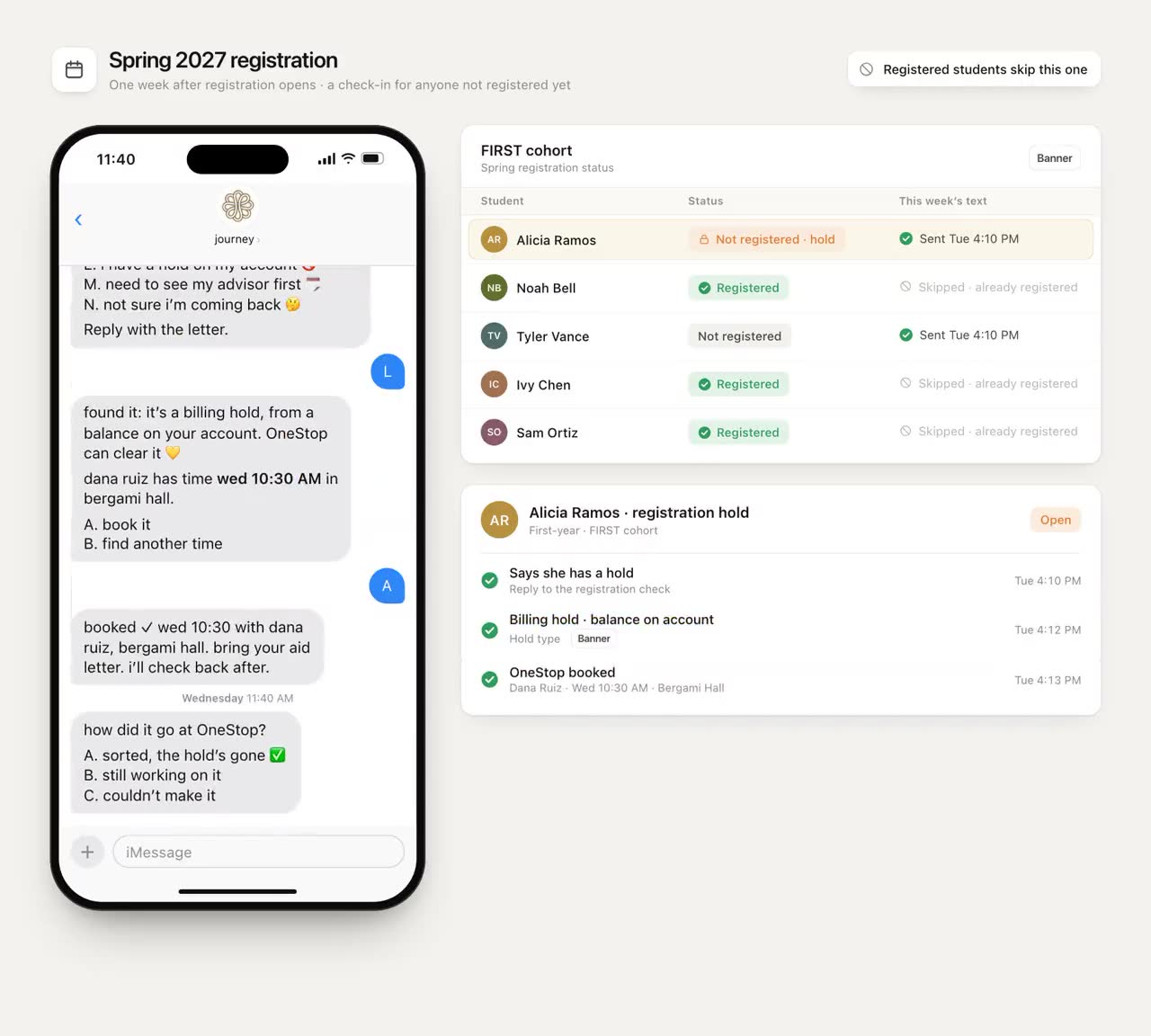
- Early, then once more. Two well-timed texts beat ten in the final week. The second goes only to students who haven't done the step.
- Not on top of other deadlines. Midterms, registration week and finals are bad weeks to ask for a tax document.
Put a person on the hard parts
Some aid questions should never get an automated answer, however good it is. A student whose parent just lost a job, a student with no contact with their parents, a student who doesn't know whether to take a loan: these need a financial aid counselor, who can use the professional judgment aid administrators have for special circumstances and who knows what your campus allows.
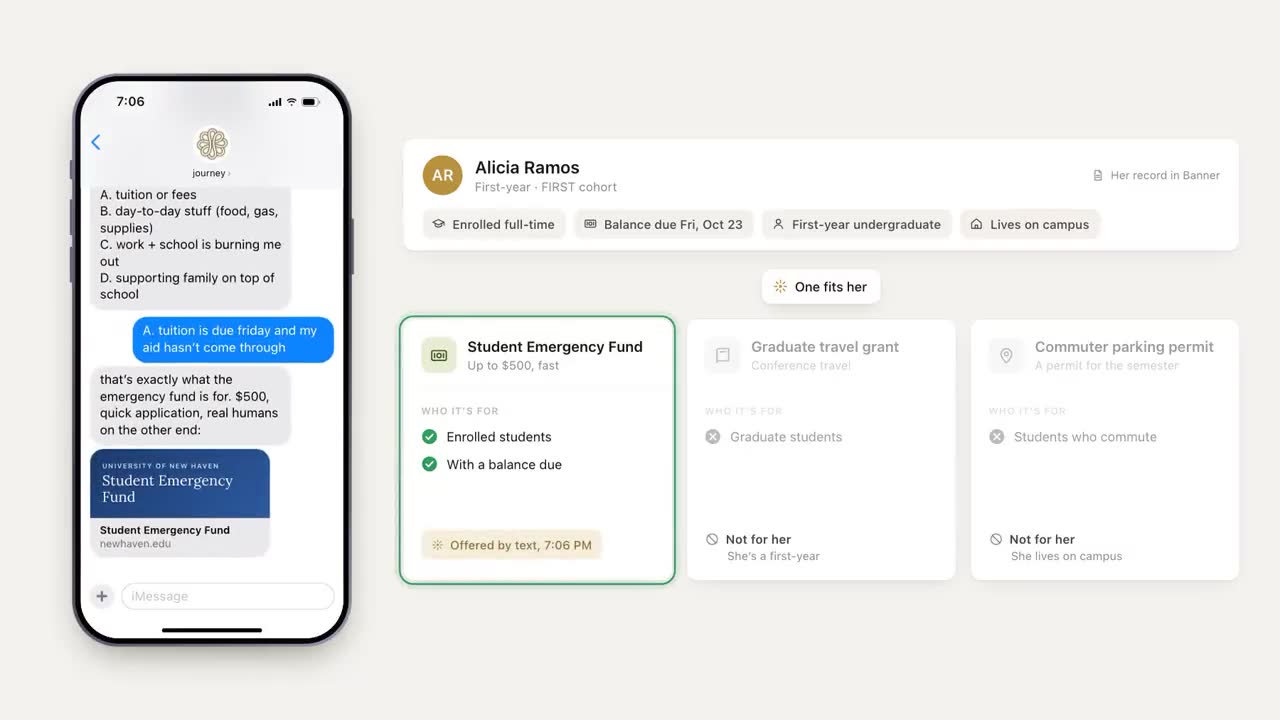
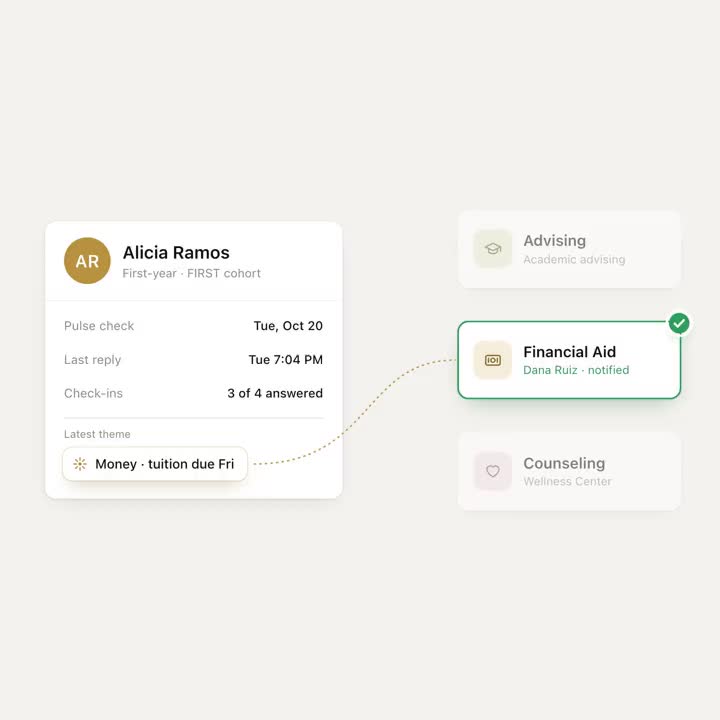
The rule worth setting, in whatever tool you use: when a student's reply is about money, a financial aid advisor reads it before anything automated replies. The student hears quickly that a person has it. The person answers with the real answer. Nobody gets a cheerful scripted reply to "my dad lost his job and i don't think i can come back."
Make the handoff easy for the student, too: a one-tap link to book financial aid, with evening or phone options if your office has them. Students who work days are often the ones with the most complicated aid, and the least able to reach a counter that closes at 4:30.
How Journey runs aid reminders
Journey texts students over SMS and iMessage, with nothing to install, so the reminder lands where they read. Aid moments run as campaigns: a sequence of scheduled nudges built from templates, sent inside each student's chosen windows, with quiet hours honored and no more than one proactive text a day. Journey reads every reply for theme and urgency. When a student answers "c," or writes anything about money, they show up on your team's dashboard as someone who needs a person, with the money theme marked for a counselor to pick up, and they get a one-tap link to book financial aid. Questions like "where is financial aid and when are they open" get answered from your campus resource base, and when Journey doesn't know something, it says so and points to a person.
Two things in our videos aren't live yet: reading a photo of a bill to fill in an emergency aid form, and the rules screen above. Today Journey texts the student a link to the form, money replies reach your staff through the dashboard, and your team decides who answers. One human check is already built in: when a meaningful reply leads Journey to write a personal follow-up nudge, a staff member approves it in Slack before it goes out.
What to measure
- Step completion, not opens. Of the students who got the verification text, how many sent the document within a week.
- Time from reminder to action, by moment. If one step routinely takes weeks, it needs a person, not another reminder.
- Replies asking for a person. These are your hardest cases and your earliest warning. Track how fast a counselor reaches them.
- Students whose aid isn't final when the term starts. The number that matters to the bursar and to the student.
- Opt-outs during aid campaigns. If they rise, you're sending too many texts, or too few of them are useful.
Questions to ask before you send anything
- Does each message ask for exactly one step?
- Would a student whose parents never went to college understand every word?
- Does the link work on a phone, without three logins?
- Is there always a way to reach a person, and does someone own those replies?
- Who reads replies about money before anything automated answers?
Start with the step that stalls
Pick the step that stalls most on your campus, often verification, and the students stuck on it right now. Rewrite the reminder as one step with three lettered replies, send every "c" to a named counselor, and compare completion after two weeks with students who got the usual email. You'll learn quickly whether the problem was the students or the message.
Frequently asked questions
How do you remind students to complete the FAFSA?
Send short texts that ask for one step at a time, such as starting the form or setting a time to do it with a parent, inside the hours the student chose. Follow up once with students who haven't done the step, and give every message a reply option that reaches a person.
When should FAFSA reminders go out?
Tie them to moments rather than one deadline: when the new form opens, ahead of your campus and state priority dates, when a student is selected for verification, and when award offers post. Your financial aid office has the dates that apply to your students.
Why do students stall on the FAFSA?
Often the blocker is a parent, not the student. On the current FAFSA, a dependent student's parents add their part through their own StudentAid.gov accounts, so a reminder to the student alone can't finish the form. Time the parent step for breaks, when families are together.
Is it okay to text students about financial aid?
Many campuses do, with the student's consent and a clear way to opt out. Keep amounts and personal details out of texts, since previews show on lock screens, never ask for a Social Security number by text, and check consent and privacy questions with your counsel.
Should a chatbot answer financial aid questions?
It can answer general questions from your own campus information, like where the office is and when it's open. Questions about a student's own circumstances, loans or appeals belong with a financial aid counselor, and the safest setup has a person read money replies first.