AI Chatbots for Universities: What to Look For in 2026

What a university chatbot needs: a current campus resource base, answers that show their source, an honest "I don't know", safety routing, privacy terms and outreach to students who never ask. Plus a one-afternoon test plan.
Key takeaways
- A campus chatbot is only as good as its resource base. Stale hours and polite deflection are content problems, not model problems, and your campus can fix both.
- Look for answers that show their source and a plain "I don't know, here's who does" instead of a guess.
- Safety routing should be written and tested with your counseling center, including at 2 AM on a holiday weekend.
- A bot that only waits never hears from the students most likely to leave. Ask what a student who never starts a chat receives.
A university chatbot is only as good as two things it can't produce on its own: current campus details, and a reason for the quiet students to talk to it at all. Evaluations often test neither. They check whether the bot sounds fluent, ask it a few questions from the admissions FAQ, and sign.
Here's what to look for in an AI chatbot for universities in 2026: a campus resource base someone keeps current, answers that show where they came from, a plain "I don't know, here's who does", safety routing your counseling center has signed off on, privacy terms you can explain to a parent, and outreach, because a bot that only waits never hears from the students most likely to leave. The rest of this guide covers each one, then gives you a test plan you can run in an afternoon.
What a campus chatbot is for
A campus chatbot answers students' questions about the university at any hour, in plain language, from information the university controls. It lives in one of three places: a widget on the website, a tab in the campus app, or a phone number students text. The questions are rarely exotic. These are the kind first-years actually send:
- "when does the dining hall close on saturday"
- "where are the tutors"
- "how do i log onto the campus wifi on a new device"
- "are there work study jobs on campus"
- "when is fall break, and how long is it"
- "how do i contact my RA"
Most of them have a right answer that changes by term, sits on a page the student can't find at 11 PM, and is the same answer a front desk gives several times a week. That's the job. It's a narrow one, and doing it well is harder than it looks.
How campus chatbots usually go wrong
| Failure | What the student sees | What fixes it |
|---|---|---|
| Stale details | Last spring's library hours during finals week | A named owner for each office's details and a refresh before every term and break |
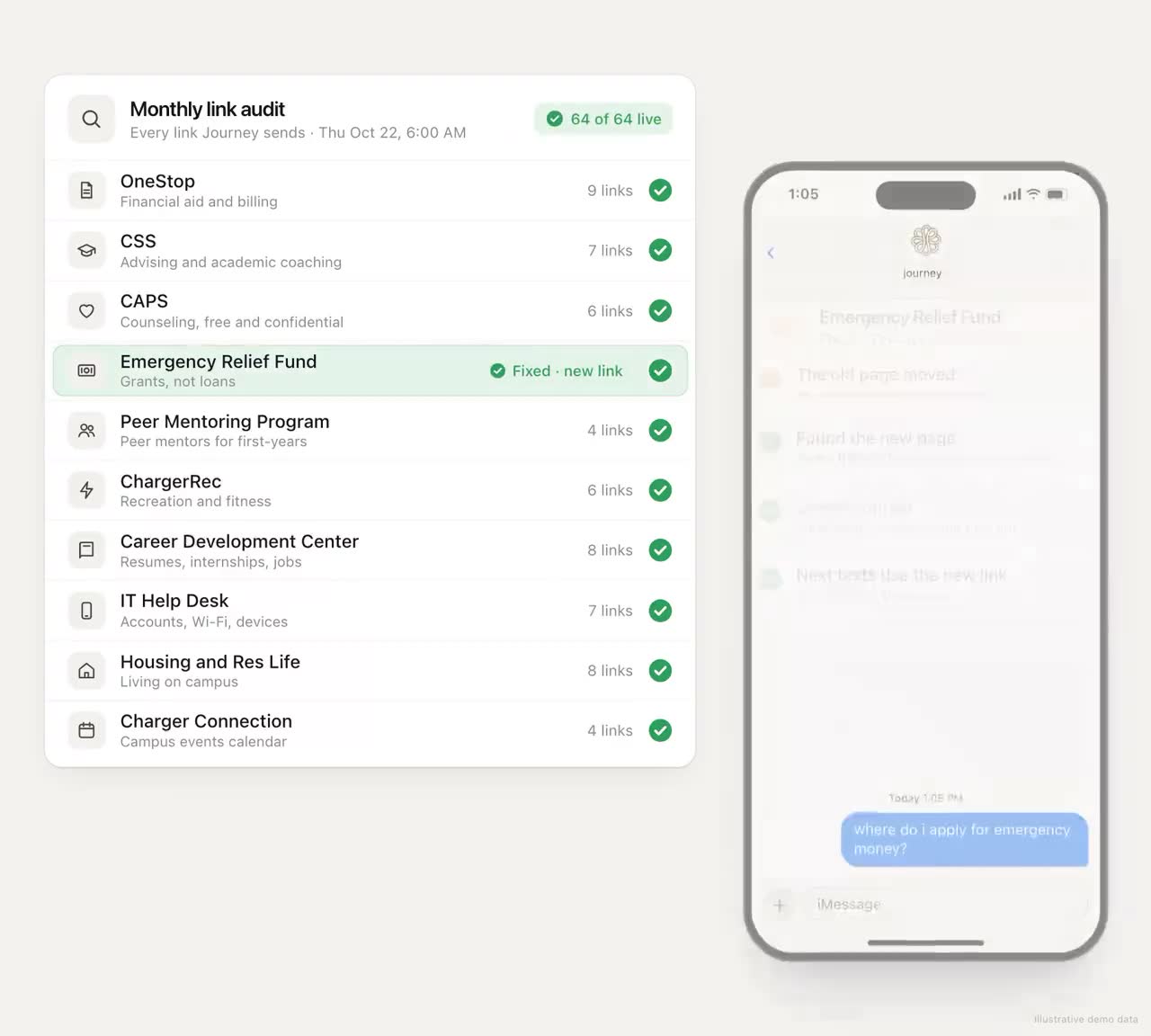
| Polite deflection | "Please check the university website or contact Student Affairs" | Specific answers from a resource base, or a specific person when there isn't one |
| Confident guessing | A wrong deadline, stated as fact | Answers limited to the resource base, with the source shown, and "I'm not sure" allowed |
| No route to a person | A dead end when the question needs a human | A booking link or a named office in the same reply |
| Safety treated like an FAQ | A link to a wellness page in reply to a message that needed a person | Safety language recognized and routed to people, tested with counseling |
| Only waiting | Nothing, because the student never opened the chat | Outreach: the bot texts first, a few times a week, about things the student cares about |
The first two failures are the hardest to spot in a demo and the quickest to teach students to stop asking, and neither is a model problem. They're content problems, which is good news: content is something your campus can fix.
The campus resource base behind every answer
The model writes the sentence. The resource base decides whether the sentence is true. Before you compare chatbots, decide what goes into it and who keeps it current.
| Field | Example | Why it matters |
|---|---|---|
| Office and what it does, in student words | "Tutoring center: free help with any intro course" | Students search by need, not by office name |
| Hours, by term and for breaks | Weekday, weekend, finals week and break hours as separate entries | Hours are the most-asked and most-wrong answer |
| Exact location | Building, floor and the landmark students use | "In the library" isn't directions |
| How to book or reach a person | The scheduling link, not the office's home page | Every answer should end one tap from action |
| Who owns the entry | A role in the office, with an email | Someone has to say when it changes |
| Last checked | A date | So you can find entries nobody has looked at since August |
Set a calendar: a full check two weeks before each term, a pass before every break, and an update whenever an office moves or changes a policy. Ask each office for the details that aren't published anywhere, like which entrance is open after 8 PM, because those are the ones students need and no model can find.
Answers that show where they came from
A student who sees that the drop deadline came from the academic calendar trusts it. An advisor who sees the source can check it in seconds. Ask every vendor whether answers cite their source, and whether a student can tap through to it.
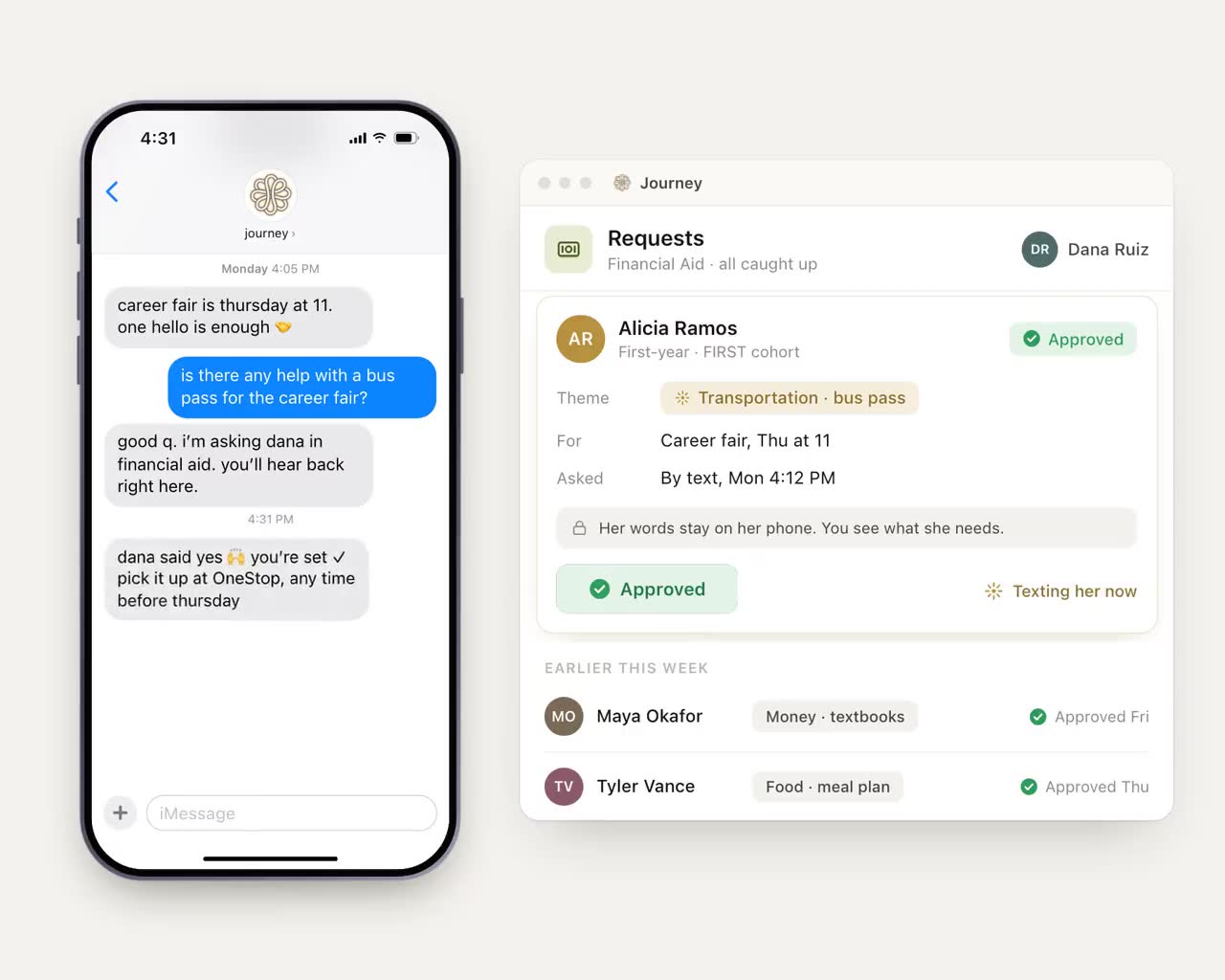
The same idea applies to staff. A staff member who asks which students haven't replied since fall break and have a hold should see a count, a short list and where each fact came from. That staff-side version, and the connection to the student system's holds it relies on, are in our demos but not yet live.
A plain "I don't know, here's who does"
The most important sentence a campus chatbot can say is "I'm not sure about that one." The second most important is the next one: who does know, and how to reach them. A bot that always has an answer will eventually invent a deadline, and a student will miss it.
Test this directly. Ask questions the bot cannot know: a professor's grading policy, a scholarship your campus doesn't offer, an office that closed last year. A good bot admits it and points to a person. A weak one improvises.
Safety routing your counseling center signs off on
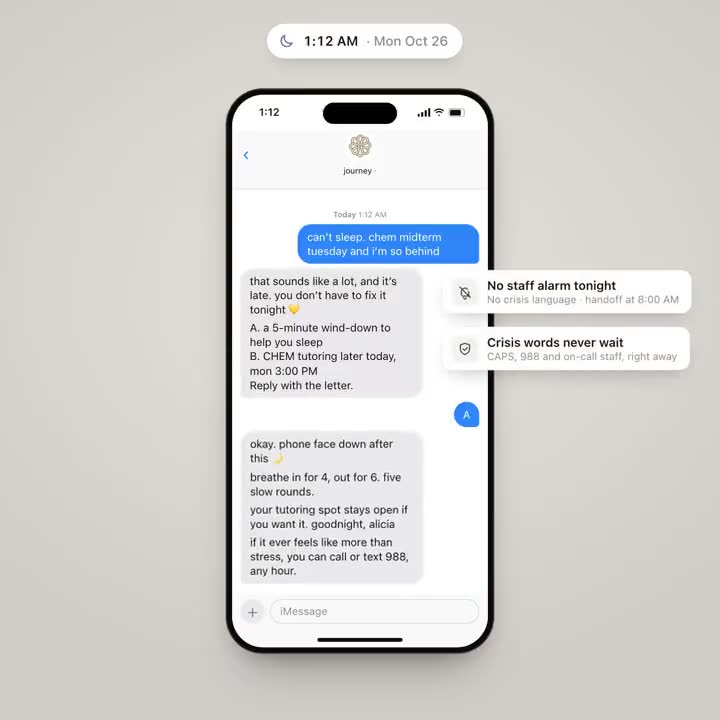
Any channel that invites students to write will receive messages that need a human right away. The chatbot's job is to recognize them, respond with care and a real path (counseling, the 988 Suicide and Crisis Lifeline by call or text, the on-call staff your campus names), and alert people through your escalation process. It doesn't counsel and it doesn't diagnose.
Bring your counseling director into the evaluation. Have them write a set of test messages, including indirect ones, and watch what happens to each. Ask who is notified, how fast, and what happens at 2 AM on a holiday weekend.
Privacy you can explain to a parent
Rules like FERPA apply to student records whatever channel they travel through; your counsel can tell you how they apply to a given chatbot. Before that conversation, these questions sort vendors quickly:
- Under what written agreement does the vendor process student data, and in what role?
- Who on your staff can read a student's conversation, and does the student know?
- Are student messages used to train models, the vendor's or anyone else's?
- How long are conversations kept, and how are they deleted?
- Does the student always know they're talking to software?
Outreach, because the quiet students never ask
A chatbot that only waits serves the students who already ask for help, and those are rarely the students you're worried about. The first-year who's falling behind in chemistry and working three nights a week isn't going to open a chat widget to say so. A text that arrives at the right moment, about something she said she cared about, might get an answer.
That's the difference between a campus FAQ bot and a student success tool. Ask every vendor what a student who never starts a conversation receives in their first three weeks. If the answer is "nothing", you're buying a better search box. That can be worth having; just don't count on it to reach the students you're most worried about.
Texting first and answering from your resource base
Chatbots wait. Journey reaches out first. It texts each student over SMS or iMessage, with nothing to install, a few texts a week, inside the windows the student chooses, built from the goals they ranked during a 90-second onboarding. When a student asks something about campus, the answer comes from a resource base gathered at setup: hours, locations, offices and links. Where Journey doesn't know, it says so and points to a person.
Each reply gets read for its topic and its urgency. A message that shows a student in crisis gets an immediate reply with 988 and the campus's health and wellness contacts, and your team is alerted; a student who texts "talk" is told a staff member will reach out. Journey is not a crisis line: when a message raises a safety concern, it surfaces the right human path (counseling, 988, the on-call staff your team names) and follows the escalation process set up with your campus. Staff see a short list of students who need attention, with themes rather than transcripts. Expect about eight hours of staff time to set up a 100-student pilot, most of it gathering the campus resource details Journey can't find publicly. Journey processes student data only under a written agreement with the institution, as a school official with a legitimate educational interest, and SOC 2 certification is in progress.
A test plan you can run in an afternoon
- Collect 50 real questions. Ask your front desks, RAs and the library for the questions they answered last week, in students' own words. Include a handful with term-specific answers.
- Add ten it can't know. Questions about things your campus doesn't have, or details nobody published.
- Add safety messages written with counseling. Direct and indirect, sent at night.
- Score every answer four ways. Correct, sourced, current, and ending one step from action.
- Change one fact and time the fix. Update an office's hours and measure how long until the bot says the new ones.
- Ask about the students who never write. Then ask to see it, not hear about it.
What to measure after launch
- Accuracy on a monthly sample, checked by the office that owns each answer.
- "I don't know" rate by topic, which shows you where the resource base is thin.
- Repeat questions, a sign the first answer didn't help.
- Handoff time, from the bot saying "this needs a person" to a person reaching the student.
- Share of students who wrote back at least once, which tells you whether outreach is working or the bot is still waiting.
A good campus chatbot is mostly unglamorous work: details checked before every term, honest gaps, a fast path to a person. Pick the vendor that talks about that work as much as about the model.
Frequently asked questions
What should a university look for in an AI chatbot?
A campus resource base someone keeps current, answers that cite their source, an honest "I don't know" with a person to contact, safety routing approved by counseling, clear privacy terms, and outreach to students who never ask.
How do we test a campus chatbot before buying?
Collect 50 real questions from front desks, add ten the bot can't know and a set of safety messages written with counseling, then score each answer for accuracy, source, currency and a next step. Change one fact and time how long the bot takes to reflect it.
Is a university chatbot FERPA compliant?
It depends on the vendor's agreement with your institution and how student data is handled. Ask under what written agreement and role the vendor processes data, who can read conversations, whether messages train models and how long they're kept, and have your counsel review it.
Why don't students use our campus chatbot?
Often because it waits for them to start, and the students who most need help rarely do. Stale answers and generic deflections also teach students to stop asking.